7 From Radio to Root Shell: Companion Computers and the UART Link
Part I has so far treated the drone from five angles: as a market artifact, as a structure, as a power system, as a sensor platform, and as an aircraft under law. Every one of those treatments assumed, without saying so, that a human being holds the sticks. This chapter removes that assumption. The subject is the companion computer — a full Linux computer bolted to the airframe beside the flight controller — and the three wires that connect it to everything the previous chapters built. The shift it produces is easy to state and hard to overstate: with a radio transmitter, the drone is a vehicle you drive; with a companion computer, it is a platform you program. The pilot’s thumbs are replaced by a process; the radio uplink is replaced by a secure shell session into an aircraft that is, from the software’s point of view, just another Linux host that happens to be able to fly. Everything in Parts II through V — mission scripting, onboard neural networks, multi-vehicle coordination, and the Goose Management System itself — runs on the machine this chapter installs.
The chapter’s structure follows the physical build order. First, the case for the second computer: what a flight controller cannot do, what a companion computer unlocks, and why this book’s platform is built from open components rather than bought as a closed product. Second, the hardware choice — Raspberry Pi versus NVIDIA Jetson — and the process of flashing an operating system onto the winner. Third, the communication problem: the three distinct paths by which commands can reach a flight controller, and why the autonomous path runs over a decades-old, three-wire serial interface called a UART. That interface is where the chapter slows down and does real engineering: why transmit must cross to receive, why both ends must agree on a baud rate, and why a shared ground wire is not optional are questions a rule of thumb answers by fiat, and this chapter answers with the underlying serial-communication physics. It closes at the bench, verifying that the assembled link actually carries a MAVLink heartbeat — the first diagnostic of every integration session, and the last piece of hardware Part I has to put in place.
7.1 Learning Objectives
- Explain the division of labor between a flight controller and a companion computer, and identify which capabilities — waypoint autonomy, computer vision, obstacle avoidance, remote network access — require the second computer and why.
- Weigh a Raspberry Pi against a Jetson-class board for a given mission using the deciding criteria: onboard GPU inference, power draw, mass, cost, and setup complexity.
- Describe the three command paths into a flight controller — RC radio, MAVLink over a telemetry radio, and an onboard companion computer — and place each on the manual-to-autonomous spectrum.
- Explain UART framing from first principles: why the interface needs no clock wire, what the start and stop bits do, why both ends must agree on the baud rate to within a few percent, and why TX and RX must cross between devices.
- Wire a companion computer to a Pixhawk TELEM2 port correctly — TX to RX, RX to TX, GND to GND, and never the 5 V pin to a signal line — and verify the finished link by receiving a MAVLink heartbeat with MAVProxy before writing any code.
7.2 Key Vocabulary
- Companion computer — a general-purpose Linux computer (Raspberry Pi, Jetson Nano, Jetson Orin NX) mounted on the airframe and wired to the flight controller, which runs the autonomy software — mission logic, computer vision, planning — that the flight controller’s real-time microcontroller cannot.
- UART (Universal Asynchronous Receiver-Transmitter) — the serial-communication peripheral, and by extension the wiring convention, that moves bytes between two devices over a dedicated transmit line, a dedicated receive line, and a shared ground, with no clock wire; each end recovers bit timing from its own oscillator plus the frame’s start bit.
- Baud rate — the signaling rate of a serial line in symbols per second (for UART, bits per second including framing bits); both ends must be configured to the same value, because it is the only timing agreement the clockless interface has.
- TELEM2 port — the Pixhawk-family telemetry connector conventionally assigned to the companion-computer link; a 6-pin JST-GH socket carrying 5 V power, 3.3 V-logic TX/RX signal lines, optional CTS/RTS flow-control lines, and ground.
- MAVLink heartbeat — the small status message every MAVLink participant broadcasts at about 1 Hz announcing its presence, type, and mode; receiving a steady stream of heartbeats is the standard proof that a telemetry link is alive end to end.
- MAVProxy — a lightweight command-line MAVLink ground station that can attach to any serial or network link; used here as a diagnostic instrument, because pointing it at a serial device and seeing heartbeats verifies wiring, baud rate, and protocol configuration in one step.
- Headless OS — an operating-system installation administered entirely over the network (typically SSH), with no monitor, keyboard, or graphical desktop attached — the only sensible configuration for a computer whose chassis is an aircraft.
- Flashing — writing a complete operating-system image onto a device’s boot medium (SD card, eMMC, or NVMe), as opposed to running an interactive installer; the standard first step in commissioning any single-board computer.
7.3 Why a Flight Controller Is Not Enough
The flight controller characterized across this Part is a marvel of specialization: a microcontroller running a real-time loop that reads the IMU at kilohertz rates, runs the estimator, and closes the attitude loop with millisecond determinism. That specialization is also its ceiling. The Pixhawk’s processor has no operating system in the desktop sense, no GPU, memory measured in fractions of a megabyte, and a scheduler whose whole design premise is that nothing unpredictable is ever allowed to run. It keeps the aircraft upright. It does not — cannot — decide where the aircraft should go, recognize what its camera sees, or serve a shell to an operator three buildings away.
The companion computer supplies exactly the missing half, and the four capabilities it unlocks map directly onto the rest of this book:
- Autonomous flight and missions. Waypoint plans can be generated, monitored, and revised on board, with no pilot in the loop — the mission-scripting subject of Part II.
- Computer vision. Object detection, recognition, and tracking in real time against the camera streams introduced in the Sensing the World chapter — the perception subject of Part III.
- Obstacle avoidance. Sensing the environment and re-routing around hazards as they appear, which requires perception and planning to run against the same clock — the behavior subject of Part IV.
- Remote network access. With a network module aboard, the aircraft can be monitored, commanded, or debugged from anywhere — an SSH session into a flying Linux host, which is what the “root shell” of this chapter’s title means literally.
A reasonable objection: commercial drones do several of these things out of the box, so why build? The answer is the difference between using a capability and owning it. A closed platform such as DJI’s is polished, tuned, and fast to fly, but it is a walled garden — the operator gets exactly the behaviors and APIs the vendor chooses to expose, the vendor’s geofencing and firmware policies apply whether or not they suit the mission, and deep custom payloads or onboard AI are difficult or impossible to bolt on. The open stack this book builds — an off-the-shelf frame, PX4 firmware, a companion computer running ROS 2 — inverts every one of those terms: full control of the flight code, freedom to choose any sensor or compute module, no vendor in the data path, and the ability to implement behaviors (a goose-harassment maneuver, say) that no consumer SDK will ever ship. The cost is that nothing works until you make it work — which is, for a book about how these systems work, precisely the point.
7.4 Choosing the Computer: Raspberry Pi versus Jetson
Two families dominate the companion-computer role, and the choice between them is the first real systems-engineering decision of a build.
The Raspberry Pi is the default for lightweight duty: cheap, small, frugal with power, backed by an enormous community, and entirely adequate for telemetry relay, logging, mission scripting, and simple sensor management. Its limitation is architectural, not incremental: it is a CPU-only machine, and modern perception is not CPU-shaped. A convolutional object detector that a GPU executes as a few large, parallel tensor operations becomes, on a Pi’s four ARM cores, a serialized slog — frame rates drop from tens per second to single digits, which is the difference between a perception system and a slideshow.
The NVIDIA Jetson family (Nano at the entry level, Orin NX well above it) exists to close exactly that gap: an ARM CPU paired with an onboard NVIDIA GPU sharing the same memory, running the same CUDA/TensorRT toolchain as a desktop or server GPU. Real-time vision pipelines, deep-learning inference, and multi-sensor fusion — the workloads of Parts III and IV — run on the GPU at frame rate. The costs are the mirror image of the Pi’s virtues: higher price, higher power draw, more mass (a Jetson wants a heatsink and often a fan), and a heavier setup process.
Figure 7.1 puts the two boards side by side with the differences labeled. Note what the two layouts share — four ARM cores, RAM, the 40-pin GPIO header that will carry this chapter’s UART link — and where they part: the block the Pi simply does not have is the block the Jetson exists to provide.
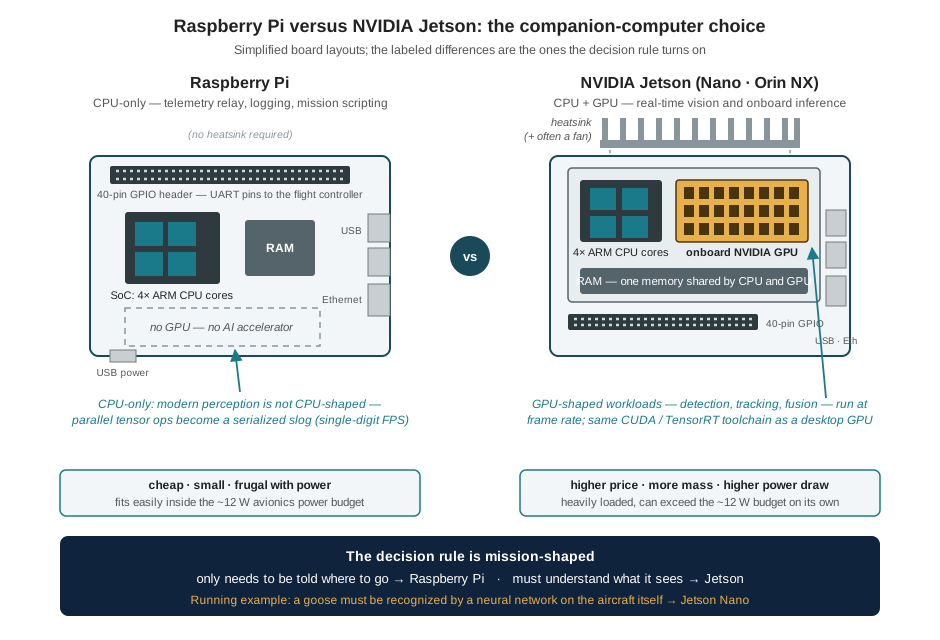
The decision rule is therefore mission-shaped: if the aircraft must understand what it sees, budget for a Jetson; if it only needs to be told where to go, a Pi is lighter, cheaper, and sufficient. Two earlier threads of this Part bear on the choice. The power budget worked in the Anatomy of a Multirotor chapter allotted roughly 12 W to the entire avionics complement — a figure a Raspberry Pi fits inside easily and a heavily loaded Jetson can exceed on its own, which is a direct endurance cost by that chapter’s arithmetic. And mass is contested for the same reason: the heatsink is paid for in seconds of loiter time. The running example pays both costs knowingly. Its aircraft is the Holybro X500 V2 sized in the Anatomy of a Multirotor chapter, flying a Pixhawk 6C, and the computer riding beside that autopilot is a Jetson Nano — because a goose has to be recognized by a neural network running on the aircraft itself, and no CPU-only board runs one at a useful frame rate.
7.4.1 Flashing an Operating System
A companion computer arrives as bare silicon; commissioning it means flashing an operating-system image onto its boot medium. For a Jetson the vehicle is JetPack, NVIDIA’s SDK: an Ubuntu-based Linux distribution bundled with the CUDA toolkit, cuDNN, and TensorRT — the entire GPU software stack, version-matched, in one image. The sequence is three steps: download JetPack; flash the device over USB using NVIDIA’s SDK Manager (or a command-line flashing script) from a host PC; then boot, complete first-time Linux setup, and install drivers, Python, and project dependencies. A Raspberry Pi follows the same pattern with simpler tooling — the Raspberry Pi Imager writes an OS image to an SD card in minutes.
One configuration decision matters more than the rest: the installation should be headless. A computer strapped to an airframe will never again have a monitor plugged into it, so the working assumption from day one is administration over the network — enable SSH during setup, configure Wi-Fi credentials before first boot, and treat the graphical desktop as dead weight (on a Jetson it is also a meaningful consumer of the very GPU the board was bought for). The practical test of a finished flash is not a login screen; it is ssh from the bench laptop succeeding — the first appearance of the root shell the chapter is named for.
7.5 Three Ways to Command a Drone
With two computers on the airframe, it is worth being precise about who can tell the flight controller what to do. There are three distinct command paths, and they form a clean spectrum from manual to autonomous:
| Path | Mechanism | Character |
|---|---|---|
| RC radio | A human pilot’s stick movements are transmitted directly to a receiver wired to the flight controller | Immediate, robust, entirely manual — the pilot is the outer control loop |
| MAVLink over a telemetry radio | A ground-control station (QGroundControl, Mission Planner) sends protocol messages — waypoints, mode changes, arm/disarm — over a wireless link | Semi-autonomous: the aircraft executes plans, but the intelligence sits on the ground, at the far end of a range-limited radio |
| Companion computer | Code running on the aircraft sends the same MAVLink messages over a wired serial link to the flight controller | Fully autonomous: perception, decision, and command all ride the airframe; no ground link is required for the mission to proceed |
The three are complements, not competitors. Every flight in this book’s program keeps the RC radio live as the safety pilot’s override — the layered-margin logic of the Airspace Law chapter, implemented in hardware — and keeps a telemetry radio attached for monitoring. But the mission itself flows through the third path, and the third path has a physical substrate: a wired serial connection between the companion computer and the flight controller. On Pixhawk-class hardware that connection is a UART.
7.6 The UART, from First Principles
The Sensing the World chapter introduced the two buses that carry sensor data inside the flight controller: I2C and SPI, both synchronous — a shared clock wire tells every participant exactly when each bit is valid. The UART is the third great serial interface of embedded systems, and its defining feature is the letter A: asynchronous. There is no clock wire. A UART link between two devices is, at minimum, three conductors: a transmit line (TX) driven by one device, a receive line (RX) listened to by the other, and a common ground. Each device contains an independent transmitter and receiver, so a full bidirectional link is TX and RX in each direction plus the shared ground — three wires total, since each data line is unidirectional and the ground is common.
Dropping the clock wire is a real engineering trade, and understanding what replaces it explains every UART wiring rule that is usually handed down without justification.
How bits survive without a clock. An idle UART line rests at logic high. To send a byte, the transmitter first pulls the line low for exactly one bit period — the start bit — then shifts out the eight data bits, least significant first, each held for one bit period, and finally returns the line high for at least one bit period — the stop bit. The receiver’s job is timing recovery: it watches the idle line for the falling edge of a start bit, waits half a bit period to land in the middle of the start bit, confirms the line is still low, and then samples the line at one-bit-period intervals thereafter — hitting, if all is well, the center of each data bit. The frame therefore carries its own synchronization: every byte begins with an edge that restarts the receiver’s timing, which is why the scheme is called asynchronous. In the common 8N1 configuration — 8 data bits, no parity, 1 stop bit — each byte costs 10 bit periods on the wire, so the useful data rate is 80 % of the baud rate.
Why the baud rate must match. The receiver times its samples with its own local oscillator, and the transmitter times its bits with its own; the configured baud rate is the agreement that makes those two clocks interchangeable. The tolerance can be computed, and it is instructive to do so. After synchronizing on the start-bit edge, the receiver takes its final sample — the stop bit — 9.5 bit periods later. If the two clocks disagree by a fraction \(\varepsilon\), the sampling point drifts by \(9.5\,\varepsilon\) bit periods by frame’s end, and the frame decodes correctly only if that drift stays inside the half-bit margin:
\[9.5\,\varepsilon < 0.5 \quad\Longrightarrow\quad \varepsilon < 5.3\ \%.\]
A total mismatch beyond about 5 % — under 3 % per side, once rise times and jitter consume part of the margin — and the receiver samples the wrong bits: framing errors, or worse, plausible-looking garbage. This is why baud mismatch is the classic serial failure mode, and why its symptom is so distinctive: a terminal full of random characters means the electrical link is fine and the timing agreement is broken. It is also why the parameter must be set identically in two places that never see each other — the flight controller’s serial-port configuration and the companion computer’s port-opening code — and why the number is worth writing down. At this book’s standard rate of 921,600 baud, one bit lasts \(1/921{,}600 \approx 1.09\ \mu\text{s}\), a 10-bit frame carries one byte in about \(10.9\ \mu\text{s}\), and the link moves at most \(921{,}600 \times 0.8 = 737{,}280\) data bits per second — roughly 90 kB/s, comfortable headroom for MAVLink telemetry and command traffic in both directions.
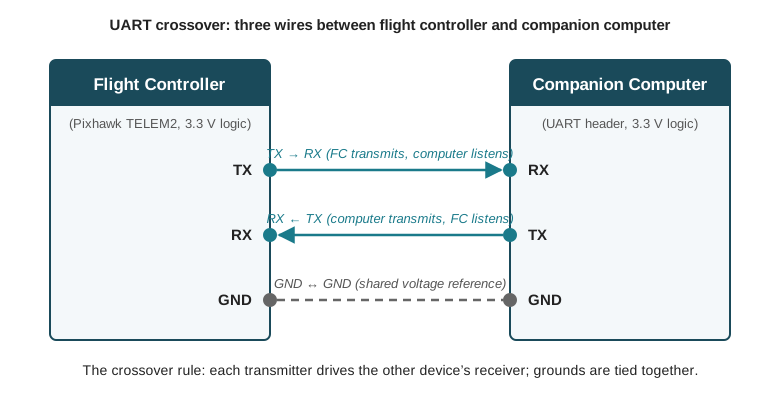
Why TX and RX must cross. Each UART pin has a fixed role: TX is an output, always driven by its own device; RX is an input, always listening. Communication therefore requires each device’s output to feed the other device’s input — the flight controller’s TX wired to the companion computer’s RX, and the companion computer’s TX to the flight controller’s RX. Wire it straight — TX to TX, RX to RX — and the result is two push-pull output drivers fighting each other on one wire (contention, and potential damage) while the two inputs listen to each other’s silence on the other. Nothing about the swap is subtle once the pin roles are stated, yet reversed TX/RX remains the single most common wiring fault in companion-computer integration, partly because different vendors label pins from different points of view. The reliable discipline is to ignore the labels and trace the signal: every wire in a UART link runs from exactly one transmitter to exactly one receiver.
Why grounds are shared. A logic signal is not a voltage; it is a voltage difference, measured between the signal conductor and a reference. The receiver decides “high” or “low” by comparing the RX line against its own ground pin. If the two boards’ grounds are not connected, that comparison is against a floating reference — the two devices’ ground potentials can drift volts apart, and the same physical signal may read as high, low, or noise depending on the moment. The third wire ties the two boards to a common reference so that “3.3 V” means the same thing on both ends. Three wires, then, and each is load-bearing: two directed data lines and the reference that gives their voltages meaning.
Figure 7.2 assembles the rule into a picture.
7.6.1 Wiring the Link: The Pixhawk TELEM2 Port
On Pixhawk-family flight controllers the conventional attachment point for a companion computer is the TELEM2 port, a 6-pin JST-GH connector whose pinout rewards close reading:
| Pin | Signal | Voltage |
|---|---|---|
| 1 (red) | VCC | +5 V |
| 2 | TX (out) | 3.3 V logic |
| 3 | RX (in) | 3.3 V logic |
| 4 | CTS (in) | 3.3 V logic |
| 5 | RTS (out) | 3.3 V logic |
| 6 | GND | GND |
Three observations turn the table into practice. First, the signal lines are 3.3 V logic while pin 1 carries +5 V power — and the red wire’s job is to make that distinction impossible to miss. Connecting the 5 V VCC pin to a 3.3 V signal input, one loose crimp away, can destroy a UART on either board; the 5 V pin exists to power small peripherals, not to signal, and in a companion-computer hookup (where the computer has its own supply) it is typically left unconnected. Second, pins 4 and 5 are hardware flow control — RTS/CTS lines by which each side can signal “stop sending, my buffer is full.” They are optional at moderate rates but recommended at 921,600 baud, where a stalled receiver can drop bytes faster than software can notice; if unused, flow control must be disabled in the flight controller’s port configuration, or it will wait forever for a permission signal that never comes. Third, on the companion side the same three signals appear on the board’s GPIO header or a dedicated serial header — on a Jetson, the pins corresponding to the device node /dev/ttyTHS1 — and carry the same 3.3 V constraint. The finished harness is three (or five, with flow control) crimped wires, and per the crossover rule the flight controller’s pin 2 (TX) lands on the computer’s RX pin while the computer’s TX lands on pin 3 (RX).
7.7 Verify Before You Code: The Heartbeat Test
The temptation after wiring is to start writing mission code; the discipline this book teaches is to first prove the link carries data, because a loose crimp or a wrong baud rate discovered through the lens of a misbehaving Python script wastes hours that a two-minute serial test would have saved. The proof is organized around a property of the protocol that will occupy Part II: every device speaking MAVLink — the standard message protocol between flight controllers, ground stations, and companion computers — broadcasts a heartbeat message at roughly 1 Hz, announcing its system ID, type, and flight mode. A heartbeat arriving on the companion computer is therefore end-to-end evidence: the wiring is right, the grounds are common, the baud rates agree, and the flight controller’s firmware is routing MAVLink to that port. The verification sequence is four steps:
- Identify the serial port. Find the companion computer’s device node for the UART that was physically wired — on a Jetson, typically
/dev/ttyTHS1; on a Raspberry Pi,/dev/serial0. - Configure the flight-controller port. In the PX4 parameter set, assign a MAVLink instance to TELEM2 and set its baud rate — the flight controller’s half of the timing agreement.
- Set port permissions. Linux guards serial devices; add the working user to the
dialoutgroup (then log out and back in) rather than reaching forsudo. - Listen for the heartbeat with MAVProxy:
# On the companion computer, attached to the wired UART:
mavproxy.py --master=/dev/ttyTHS1 --baudrate 921600

# A healthy link prints, within a second or two:
#   Heartbeat from system 1
The test doubles as a diagnostic decision tree. Silence — no heartbeat at all — points at the physical layer or configuration: TX/RX not crossed, a missing ground, the wrong device node, or a flight-controller port not yet assigned to MAVLink. Garbage — a stream of malformed bytes or framing errors — is the baud-mismatch signature derived above: the electrons are arriving, the timing agreement is broken. A steady heartbeat is the milestone: the flight controller and the companion computer are peers on a working link, and every subsequent layer — MAVLink commands, the MAVSDK library, the ROS 2 bridge — is software riding on a wire already known to be good. What those layers look like, and how a Python program turns this link into an autonomous takeoff, is where the PX4 and the Autopilot Stack chapter in Part II picks up.
With that heartbeat, the physical platform is complete. The airframe is sized, the power system budgeted, the sensors understood, the regulations mapped, and a programmable computer now sits on the aircraft with a verified channel to the machine that flies it. What is still missing is the view of the whole: how these pieces stand to one another once they are assembled into a single vehicle that flies a mission by itself. That is where Part I ends, and it is the last thing to settle before the work becomes code.
7.8 Check Your Understanding
- A flight controller already contains a processor. State precisely what the companion computer adds, and give the architectural reason the flight controller cannot simply absorb those functions.
The companion computer adds general-purpose compute under a full Linux OS: onboard mission planning, computer-vision inference, obstacle avoidance, and network access (SSH, remote monitoring). The flight controller cannot absorb these because it is a real-time microcontroller: its scheduler guarantees millisecond-deterministic attitude control precisely by excluding unpredictable workloads, and it lacks the memory, OS services, and GPU that perception and planning software require. The division of labor is deliberate — hard-real-time stability on one processor, computationally heavy intelligence on the other — with a serial link between them.
- A team is building two aircraft: one relays telemetry and executes pre-planned GPS waypoint missions; the other must detect and track objects with an onboard neural network. Recommend a companion computer for each, and justify both recommendations with the deciding criterion.
The waypoint aircraft should fly a Raspberry Pi: mission scripting and telemetry relay are light CPU workloads, and the Pi wins on cost, mass, power draw (well inside a ~12 W avionics budget), and simplicity. The detection aircraft needs a Jetson (Nano or Orin NX): real-time neural-network inference is a GPU-shaped workload, and a CPU-only Pi drops to single-digit frame rates on modern detectors. The deciding criterion is whether the mission requires onboard GPU inference; every other factor (power, mass, cost, setup effort) argues for the Pi, which is why the Jetson is chosen only when perception forces it.
- Explain why a UART link fails if the two ends’ baud rates differ by, say, 10 %, using the receiver’s sampling mechanism — and compute the approximate maximum tolerable total clock mismatch for a 10-bit frame.
The receiver has no clock wire; it resynchronizes on each start-bit edge and then samples at intervals timed by its own oscillator, aiming for the center of each bit. A fractional rate mismatch \(\varepsilon\) makes the sampling point drift by \(9.5\,\varepsilon\) bit periods by the final (stop) bit of a 10-bit frame; correct decoding requires that drift to stay within half a bit: \(9.5\,\varepsilon < 0.5\), so \(\varepsilon < 5.3\ \%\) total (in practice under ~3 % per side once noise and rise times eat margin). At 10 % mismatch the sample point has drifted a full bit period before the frame ends, so the receiver reads wrong bits — the classic symptom being a stream of garbage characters and framing errors rather than silence.
- A student wires flight-controller TX to companion-computer TX and RX to RX, reasoning that “like connects to like.” Describe both electrical consequences of this wiring and state the rule that prevents it.
TX is always an output and RX always an input. TX-to-TX places two output drivers on the same wire: whenever they drive opposite logic levels, current flows directly between the drivers (bus contention), which at best corrupts the line and at worst damages a transceiver. RX-to-RX places two inputs on one wire with no driver at all, so both receivers listen to a floating line and hear nothing. The rule: every UART wire must run from exactly one transmitter to exactly one receiver — cross TX to RX in both directions, and verify by tracing signal direction rather than trusting pin labels, which vendors write from inconsistent points of view.
- The Pixhawk TELEM2 pinout puts +5 V on pin 1 (the red wire) and 3.3 V logic on pins 2-5. Explain the hazard this adjacency creates, and why the 5 V pin is usually left unconnected in a companion-computer harness.
The hazard is crossing power into a signal line: a mis-crimped or mis-seated connector can present +5 V to a UART input designed for 3.3 V logic, overstressing and potentially destroying the transceiver on either board. The red wire convention exists to keep the power pin visually distinct. It is left unconnected because its purpose is to power small peripherals (e.g., a telemetry radio), and a companion computer has its own independent supply — so the harness needs only the two crossed signal lines, ground, and optionally the RTS/CTS pair; omitting VCC removes the failure mode entirely.
- After wiring,
mavproxy.py --master=/dev/ttyTHS1 --baudrate 921600prints nothing at all. A second attempt at a different baud rate prints unreadable garbage. Diagnose both observations.
Garbage is diagnostic gold: it means the physical layer works — electrons are arriving with edges the receiver can see — but the timing agreement is broken, i.e., the flight controller is transmitting at a different baud rate than the one MAVProxy is now using. Total silence at the (correct) first baud rate therefore most likely means the configuration is wrong somewhere other than wiring — commonly, the flight controller’s TELEM2 port has not been assigned a MAVLink instance at 921,600 baud. (Silence in general implicates the physical layer too — TX/RX not crossed, missing ground, wrong device node — but the garbage observation has already exonerated the wiring.) The fix: set the flight controller’s serial protocol and baud parameters for TELEM2 to match, then rerun the heartbeat test at 921,600.
7.9 Try It
Part 1 — decode a UART frame by hand. Draw the voltage-versus-time waveform for the byte 0x4D (ASCII M, binary 01001101) transmitted in 8N1 format at 9,600 baud: idle high, start bit low, eight data bits least-significant-bit first, stop bit high. Label the duration of each bit period in microseconds. Then play receiver: mark the sampling instant for each bit (start-bit edge plus 1.5, 2.5, … bit periods) and confirm the byte decodes. Finally, redo the sampling marks assuming your receiver’s clock runs 4 % fast, and identify the first bit at which the sampling point has left the correct bit cell — then check your answer against the \(9.5\,\varepsilon < 0.5\) margin from the chapter. If you have access to a logic analyzer or an oscilloscope and any UART source (an Arduino’s serial port suffices), capture a real frame and repeat the exercise against the measured waveform.
Part 2 — bring up a real link and break it on purpose. Using any two UART-capable devices available to you — a Pixhawk and a Jetson or Pi is ideal, but two USB-serial adapters looped together, or a Pi and an Arduino, teach the same lessons — wire the three-conductor crossover and run the heartbeat test (or, for non-MAVLink devices, an echo test with a terminal program at both ends). Document the working configuration: device nodes, baud rate, and which physical pin each wire lands on. Then break the link three ways, recording the observed symptom of each: swap TX and RX (expect silence), change one end’s baud rate by a factor of two (expect garbage), and disconnect the ground while keeping both data lines attached (expect anything from intermittent errors to apparent normality — and write two sentences on why this failure is the most dangerous of the three precisely because it can seem to work). Conclude with the diagnostic table you would hand a teammate: symptom in one column, most probable cause and first check in the other.
Related Lab: See Appendix B for the lab assignment that applies this chapter’s concepts.