15 Building a Detection Pipeline: Data, Labeling, and Training
The TinyML chapter left its own frame deliberately unfinished. It laid out the deployment pipeline — dataset → train → convert → optimize → deploy → infer — then spent all of its pages on the second half, on the grounds that what can usefully be trained is dictated by where the result must run. The constraints are now settled: the running example’s detector lives on the companion tier, quantized to int8, its input resolution negotiated against the pixels-on-target arithmetic of the Images as Data chapter. What is still missing is the center of the frame — the trained model itself, which means the dataset of geese and not-geese, the labeled boxes, the training run, and the numbers that say whether any of it worked. This chapter builds that center, and it is where Part III stops preparing and starts building.
One reorientation is needed at the outset, because it decides where the effort goes. Every previous quantitative chapter of this book has been about computation: control laws, memory bills, quantization arithmetic. A detection pipeline is the first piece of the system whose behavior is fixed not by code but by data — the model’s kernels take whatever values the dataset teaches them, and no amount of downstream engineering recovers what the dataset failed to contain or, worse, mislabeled. The practical consequence is an inversion of where a newcomer expects the time to go. Training a small detector is minutes of rented GPU time and five lines of Python; collecting and labeling the images it learns from is days of unglamorous work, and it is the bottleneck of every real detection project. The chapter therefore walks the pipeline in the order the work actually happens — collect, label, split, train — and then dwells, longer than practical guides usually do, on the demand such guides state in three words and leave undefined: show evaluation metrics. Precision, recall, and mAP are the vocabulary in which a detector’s fitness for a mission is argued, and this chapter works all three from raw counts up.
15.1 Learning Objectives
- Lay out the stages of a detection pipeline — collect, extract, label, split, train, evaluate — and identify which stages consume the effort and which the compute.
- Build a labeled object-detection dataset from raw video: extract and select frames, draw bounding-box annotations with a labeling tool, and express every label in normalized YOLO format by hand.
- Construct a train/validation split that measures generalization rather than memorization, and explain why video frames must be split by recording session, not shuffled individually.
- Fine-tune a pretrained YOLOv8 model on a small custom dataset, and explain what transfer learning contributes when the dataset is only a few hundred images.
- Define IoU-based detection matching, compute precision and recall from a small confusion matrix, and trace how sweeping the confidence threshold turns those counts into a precision–recall curve, AP, and mAP.
- Read a trained detector’s failure cases as a specification for the next round of data collection.
15.2 Key Vocabulary
- Ground-truth annotation — the labeled fact a training example carries: for detection, a hand-drawn bounding box plus a class identity for every object of interest in the image, treated by training and evaluation alike as the truth against which the model is measured.
- YOLO format — the plain-text label convention used by the YOLO family: one
.txtfile per image, one line per object, each line a class index followed by the box’s center coordinates, width, and height, all normalized to the range \([0,1]\) by dividing by the image’s dimensions. - Train/validation split — the division of a dataset into images the optimizer learns from and images reserved for measurement only; the validation side exists to estimate performance on data the model has never seen, and is honest only if nothing resembling it leaked into training.
- Data augmentation — synthetically varying training images (flips, crops, color shifts, mosaics) each time they are shown to the model, so a small dataset teaches invariances — lighting, viewpoint, scale — that it is too small to demonstrate with real examples.
- Transfer learning — initializing a model from weights pretrained on a large general dataset and fine-tuning on a small task-specific one, so the early layers’ general visual features (edges, textures, shapes) are inherited rather than relearned from scratch.
- IoU (Intersection over Union) — the overlap score between two boxes: the area of their intersection divided by the area of their union, ranging from 0 (disjoint) to 1 (identical); a predicted box matches a ground-truth box when their IoU clears a chosen threshold, conventionally 0.5.
- Precision — of all the detections the model reported, the fraction that were real: \(\text{TP}/(\text{TP}+\text{FP})\); low precision means false alarms.
- Recall — of all the objects actually present, the fraction the model found: \(\text{TP}/(\text{TP}+\text{FN})\); low recall means misses.
- mAP (mean Average Precision) — the standard single-number summary of a detector: for each class, the area under the precision–recall curve swept out by varying the confidence threshold (that class’s AP), averaged over all classes; reported at a fixed IoU threshold (mAP@0.5) or averaged over a range (mAP@0.5:0.95).
- Confidence threshold — the score cutoff below which a detection is discarded at inference time; an operating-point choice that trades precision against recall and belongs to the system designer, not the model.
15.3 The Shape of the Work
Figure 15.1 lays the whole pipeline out, with the two stages the TinyML chapter already built shown in outline at the far end. Reading it left to right gives the order of operations; reading where its emphasis falls gives the order of importance. The amber stages — labeling, training, evaluation — are this chapter’s center of mass, and the red return arrow along the bottom is its most important single edge: a deployed detector’s mistakes are not merely failures to be lamented but a precise, prioritized specification of what data to collect next. A detection pipeline is not a line; it is a loop that happens to be drawn as one.
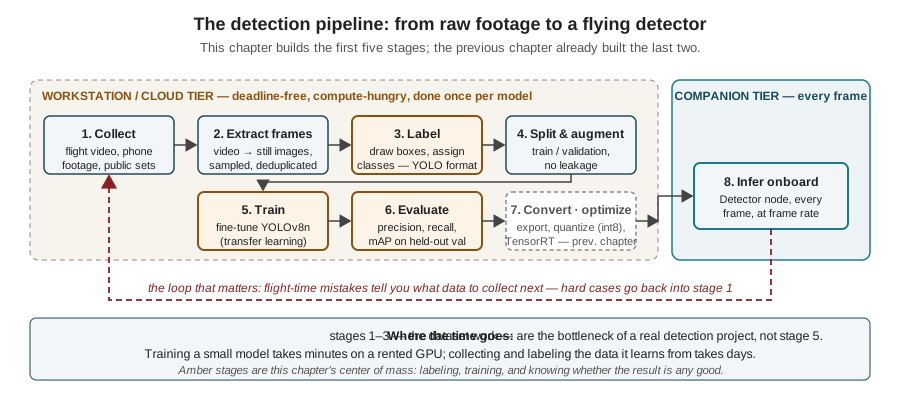
The tier assignments come straight from the placement argument of the TinyML chapter and need no re-litigating: everything up to and including evaluation is bursty, deadline-free, compute-hungry work that belongs on a workstation or the cloud tier, and only the final inference stage runs on the aircraft. What the figure adds is a budget for attention. The stages that look like machine-learning work — picking an architecture, running the optimizer — are the most automated and least decisive parts of the pipeline. The stages that look like clerical work — choosing which frames to keep, drawing boxes tightly, deciding what counts as which class — are where the detector’s ceiling is set. The sections that follow take the stages in order, spending effort in proportion to that budget.
15.4 Collecting the Data
The raw material of a detection dataset is footage: recorded flight video from the platform’s own camera is best, because it samples the exact viewpoint, altitude, optics, and scene statistics the deployed model will face, but phone or action-camera footage of the same subjects, and public video of comparable scenes, all serve — particularly early, when the goal is a first working model rather than a final one. What matters far more than the source is the spread. A detector generalizes only across variation it has seen: a dataset collected in one session, at one altitude, under one sky, produces a model superbly calibrated to that hour and brittle everywhere else. The collection checklist is therefore written in the mission’s terms — multiple lighting conditions, multiple altitudes and therefore target scales (the pixels-on-target arithmetic of the Images as Data chapter says a goose at 20 m is a 7-pixel object in the 640-column mode, so if the mission will fly at 20 m the dataset must contain 7-pixel geese, not just the flattering close-ups), multiple backgrounds, and — easy to forget — frames containing no targets at all, plus frames containing the confusable near-misses the model must learn to reject. For the running example that last category has a name: other birds. A detector that has only ever seen geese labeled as geese has never been taught that a duck is not one.
Video becomes a dataset by frame extraction, and the step carries one non-obvious decision: the sampling interval. Thirty frames per second of the same scene are not thirty examples; they are one example, photocopied. Consecutive frames are near-duplicates, and a dataset padded with them is smaller than it looks and — as the splitting section will show — dangerous in a specific way. Sampling every second or two of footage, then culling blurred and empty-sky frames by eye, turns an afternoon of flying into a few hundred genuinely distinct images:
import cv2

cap = cv2.VideoCapture("flight_a.mp4")
fps = cap.get(cv2.CAP_PROP_FPS)            # e.g. 30.0
step = int(fps * 2)                        # keep one frame every 2 s
i = saved = 0
while True:
    ok, frame = cap.read()
    if not ok:
        break
    if i % step == 0:
        cv2.imwrite(f"raw_frames/flight_a_{saved:04d}.jpg", frame)
        saved += 1
    i += 1
How many images are enough? A useful floor for a first fine-tuned model is a few dozen labeled images per contributor and a hundred-odd overall — enough, with transfer learning and augmentation carrying the rest, to demonstrate the workflow and produce a model that visibly works on footage like its training data. A model to rely on wants an order of magnitude more, gathered iteratively as the loop at the bottom of Figure 15.1 reveals what is missing. The number that matters is never the count; it is the coverage.
15.5 Labeling: Drawing the Ground Truth
Labeling is where a pile of images becomes a dataset: a human looks at each frame and records, in machine-readable form, what a perfect detector would have said about it. For object detection that record is a set of ground-truth annotations — one bounding box, as tight as the pixels allow, plus one class identity, for every object of interest in the frame. The tooling is mature and interchangeable: LabelImg (a lightweight desktop annotator), CVAT (a self-hostable web tool built for team-scale annotation), Roboflow (a hosted platform that adds dataset management, format conversion, and augmentation), and makesense.ai (a no-install browser tool) all present the same core interaction — drag a rectangle, pick a class — and all export the standard interchange formats. Which format is a detail worth pinning down precisely once, because every training framework speaks one of two dialects: COCO format, a single JSON file describing every image, box, and category in pixel coordinates; and YOLO format, the one this pipeline uses, which Figure 15.2 specifies down to the arithmetic.
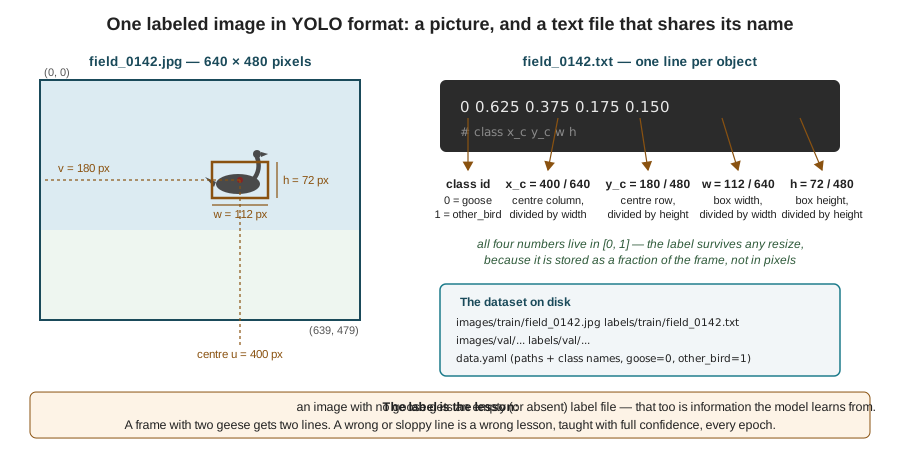
The format rewards a close reading. Each line is five numbers: a class index (from a data.yaml file that maps goose to 0 and other_bird to 1), then the box’s center \((x_c, y_c)\) and its width and height — the same center-plus-extent parameterization the Images as Data chapter introduced for detector outputs, which is no coincidence: the label format mirrors what the model must learn to produce. All four coordinates are normalized — divided by the image’s width or height — so the figure’s 112 × 72-pixel box centered at pixel \((400, 180)\) in a 640 × 480 frame becomes the line 0 0.625 0.375 0.175 0.150. Normalization is what lets the label survive the preprocessing gauntlet: the frame will be resized and letterboxed on its way into the model, and a label stored in fractions of the frame needs no rewriting when the frame changes size.
The mechanical format is the easy half of labeling; the hard half is consistency, and it is worth three rules, prefaced by the blunt truth that motivates all of them: the model learns from the labels it is given, and if the labels are wrong, it learns the wrong lesson — with full confidence, every epoch. First, boxes are tight: the annotation convention is the smallest axis-aligned rectangle containing the visible object, and a labeler who leaves generous margins is teaching the model that geese include a halo of grass, which will surface months later as systematically loose predicted boxes and depressed mAP@0.5:0.95. Second, class boundaries are written down before labeling begins: is a swimming goose with a hidden body a goose? A bird too distant to identify? Two labelers who answer differently produce a dataset that disagrees with itself, and the model splits the difference. Third, nothing is skipped silently: an unlabeled goose in a training image is not a missing label — it is a negative label, an assertion that this patch of pixels is background, and every such assertion actively teaches the model to ignore exactly what it is supposed to find. Auditing a sample of teammates’ labels before training, tedious as it sounds, is the highest-leverage hour in the pipeline — and visualizing the dataset with its boxes drawn before any training run is the same discipline in single-person form.
Manual labeling costs about a minute per box, which prices a ten-thousand-image dataset in weeks of human attention — and that arithmetic is why automated labeling pipelines are the standard advanced extension of this material. Two foundation models changed the economics. Grounding DINO performs open-vocabulary detection: given an image and a text prompt (“goose”, “bird”), it proposes bounding boxes for the named concept without any task-specific training. SAM (Segment Anything Model) and its video-capable successor SAM2 do the complementary job: given a point, box, or rough prompt, they produce a pixel-precise mask of the indicated object, and SAM2 can propagate that mask through subsequent video frames — so one click on a goose in frame 1 can yield boxes for the next several hundred frames. Chained together — Grounding DINO proposes, SAM refines, a human verifies and corrects rather than draws — such semi-supervised pipelines reduce manual effort by an order of magnitude. The human is not removed: foundation-model proposals inherit their own biases (Grounding DINO will happily box gulls under the prompt “goose”), so the pipeline’s output is a set of initial annotations for refinement, and the audit step becomes the labeling job. The trade is the same one every chapter of this Part has priced: these models are enormous and run on the cloud tier — offline labeling assistance is precisely the deadline-free workload that tier exists for.
15.6 Splitting the Data: The Honest Held-Out Set
Before training, the labeled dataset is divided: most images (a customary 80%) become the training set the optimizer grinds against; the remainder becomes the validation set, which the optimizer never touches and which exists solely to answer one question — how does the model do on images it has not seen? The question matters because a neural network with millions of parameters and a few hundred training images can, in the limit, simply memorize the answers; performance on the training set is therefore evidence of nothing. Only the validation score estimates the quantity the mission cares about, which is performance on the next flight’s footage.
That estimate is honest only if the split is, and video-derived datasets fail the honesty test in one specific, near-universal way. Figure 15.3 shows it. Shuffle all extracted frames and split randomly, and every validation frame has near-duplicate siblings — same flock, same light, same background, seconds apart — sitting in the training set. The model is then graded on questions it has effectively already seen; validation scores come back gratifyingly high, and they are a lie, one that stays hidden until the first flight over new ground. The failure has a name — leakage — and a simple fix: the unit of splitting is the recording session, never the frame. Whole flights, whole sessions, ideally whole days and sites, are assigned to one side or the other, so the validation set is footage the model has never seen a neighbour of.
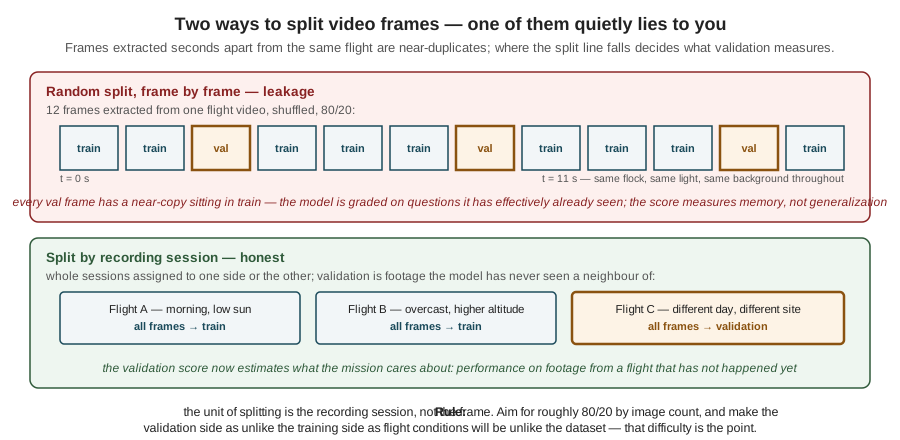
The session-level split usually lowers the validation score, sometimes sharply — and that drop is not a cost but a correction: the number was wrong before. The same reasoning, incidentally, has already appeared in this Part wearing different clothes: the TinyML chapter’s warning that a quantization calibration set must span flight conditions, not convenience conditions, is the same principle applied one pipeline stage later. Held-out data is a measuring instrument, and an instrument contaminated by its subject measures nothing.
What the split takes away in flattery, data augmentation partially gives back in substance. Each time a training image is shown to the model, it is randomly perturbed — flipped horizontally, scaled and cropped, jittered in hue and brightness, or composited into a mosaic of four training images at once, a YOLO-family staple that manufactures scale variation and crowded scenes from sparse data. A hundred images become, in effect, an endless stream of variants, and the invariances the dataset is too small to demonstrate with real examples — geese face either way, sunlight is not part of goosehood — are taught synthetically. Two cautions keep the technique honest. Geometric augmentations must transform the labels along with the pixels (flip the image, flip every \(x_c\) — the frameworks handle this, but only for the augmentations they know about), and augmentation applies to the training set only: a validation set that is also augmented is measuring performance on the augmenter, not the world.
15.7 Training: Borrowed Features, New Classes
With images/, labels/, and data.yaml in place, the training itself is almost anticlimactic — deliberately so, because the hard decisions were made upstream. The pipeline fine-tunes YOLOv8n, the nano variant of a widely used single-stage detector family: about 3.2 million parameters, which the alert reader will recognize as the previous chapter’s illustrative memory bill made flesh — roughly 12.8 MB of float32 weights, 3.2 MB after the int8 quantization that same chapter developed, comfortably inside the companion tier’s budget. “Single-stage” means the network maps the input tensor to boxes in one forward pass, predicting, at every position of its final feature maps, box coordinates and per-class scores directly — the output structure the Images as Data chapter’s task taxonomy assigned to detection, produced at the frame rates the aircraft needs.
The decisive move is where the initial weights come from. Training a 3.2-million-parameter network from random initialization on a hundred-image dataset fails outright — there are vastly more parameters than facts to constrain them. Transfer learning sidesteps the arithmetic: training starts from weights pretrained on a large general-purpose detection dataset, and the small custom dataset only has to adapt them. The division of labor falls along the network’s depth, exactly as the Images as Data chapter’s feature-map story predicts: the early layers’ kernels — edge, texture, and shape detectors — are generic visual machinery that transfers unchanged, while the later layers and the detection head, which compose those features into class-specific evidence, are what fine-tuning actually rewrites. The pretrained model already knows a great deal about birds; the dataset’s job is only to teach the difference between goose and other_bird, and a few hundred images genuinely suffice for that. Running the pretrained model on the validation images before fine-tuning makes the point empirically — it boxes the birds competently and calls them all bird, class 14 of somebody else’s dataset — and provides the baseline against which the fine-tuned model’s improvement is the pipeline’s key teaching moment.
from ultralytics import YOLO

model = YOLO("yolov8n.pt")        # pretrained weights: the borrowed features
model.train(data="data.yaml", epochs=50, imgsz=640)
metrics = model.val()             # precision, recall, mAP50, mAP50-95
What the optimizer minimizes is the composite loss the Images as Data chapter promised to return to: a classification term scoring the per-class predictions at each output position, and a box-geometry term scoring predicted rectangles against ground-truth ones by their overlap (some detector families carry a third, a standalone objectness/confidence term). The training run emits the curves of both falling epoch by epoch, alongside validation metrics rising — and the reflex for reading them is the one Part II taught for PID tuning: curves are diagnostics, not decoration. Training loss falling while validation metrics stall or reverse is overfitting, the memorization failure the held-out set exists to catch, and the standard responses — stop earlier, augment harder, collect more data — all amount to re-balancing parameters against facts. But “validation metrics rising” presumes the metrics mean something to the reader, and this is exactly the point where most practical treatments go quiet. The next section does not.
15.8 Did It Work? Precision, Recall, and mAP
A classifier is easy to score: its answer is right or wrong, and accuracy is a percentage. A detector’s answer is a list of localized boxes, and scoring it requires two decisions a classifier never faces: what counts as “found” (a box in roughly the right place? exactly the right place?), and how to trade the two distinct ways of being wrong — crying goose at empty grass, and staying silent over a real one. The standard machinery resolves both, and it is worth building from the ground up because every number a training framework prints is made of it.
The first decision is settled by IoU — Intersection over Union — the overlap score between a predicted box and a ground-truth box: the area both cover divided by the area either covers. Figure 15.4 works one case through: a prediction and a truth box of 8,000 px² each, overlapping in a 4,900 px² region, giving
\[ \text{IoU} = \frac{4{,}900}{8{,}000 + 8{,}000 - 4{,}900} = \frac{4{,}900}{11{,}100} = 0.44. \]
Against the conventional matching threshold of 0.5, that detection — which a human would call “basically right, a bit off” — does not count. The strictness is deliberate: for the running example, the box centre becomes a steering bearing and indexes the depth map, so a box half-off the goose is operationally a miss. With matching defined, every detection and every ground-truth object receives exactly one verdict. A detection matching an unclaimed truth box at IoU ≥ 0.5 with the correct class is a true positive (TP); a detection with no match — wrong place, wrong class, or a duplicate box on an already-claimed object — is a false positive (FP); a labeled object no detection matched is a false negative (FN). One verdict is conspicuously absent: the true negative, all the background correctly left unboxed, is uncountable — there are indefinitely many rectangles a detector correctly did not draw — which is why detection is scored by precision and recall rather than accuracy, and why the detection confusion matrix has a permanently empty cell.
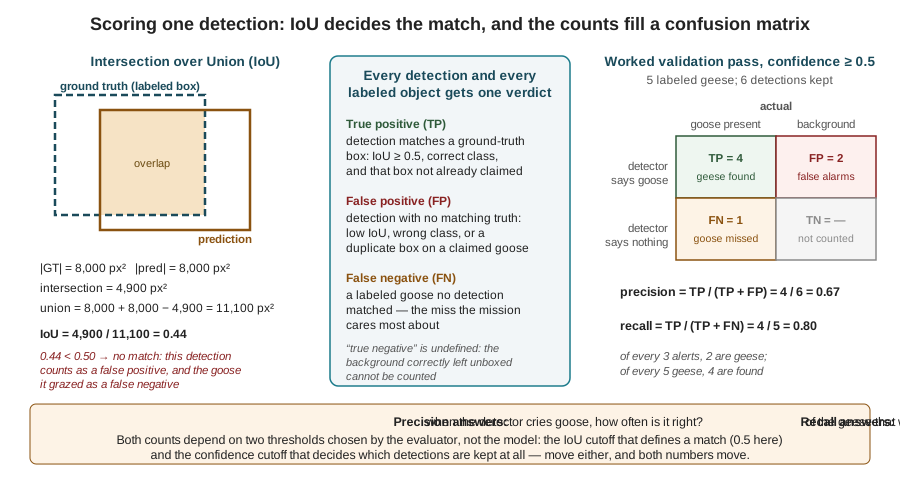
The figure’s right panel runs the counts for a deliberately tiny worked example that the rest of this section will reuse: a validation set containing 5 labeled geese, against which the detector, keeping only detections with confidence ≥ 0.5, reports 6 boxes — 4 of them matching geese, 2 of them false alarms, with 1 goose found by nothing. The confusion matrix holds TP = 4, FP = 2, FN = 1, and the two headline numbers follow:
\[ \begin{aligned} \text{precision} &= \frac{\text{TP}}{\text{TP}+\text{FP}} = \frac{4}{6} = 0.67, \\ \text{recall} &= \frac{\text{TP}}{\text{TP}+\text{FN}} = \frac{4}{5} = 0.80. \end{aligned} \]
Read them as sentences, because that is how they are used in a design meeting: when this detector cries goose, it is right two times in three (precision), and of the geese actually present, it finds four in five (recall). Neither number alone characterizes the detector, because each can be bought at the other’s expense with a single knob — the confidence threshold. Raise it to 0.9 and only the surest detections survive: precision climbs, recall collapses. Lower it to 0.1 and everything vaguely birdlike gets a box: recall climbs, precision collapses. The threshold is an operating point, chosen by the system designer against mission costs — and for the running example the costs are asymmetric in an instructive way. A false positive sends the aircraft to harass an empty patch of grass: wasted battery, mild embarrassment. A false negative leaves a goose unharassed in a protected field: the mission’s entire purpose, unmet. The running example therefore operates deliberately down-threshold of the precision-recall balance point, accepting more false alarms to miss fewer geese — a choice no training framework can make, because it is written in the currency of the mission, not the model.
Because the threshold is arbitrary, a fair comparison between detectors must not depend on it — and that requirement is exactly what AP exists to satisfy. The construction, worked in Figure 15.5 on the same 5-goose validation set, is mechanical: take every detection the model offers, sorted by confidence descending, and walk down the list, treating each rank as an operating point and recording cumulative precision and recall there. The full ranking for the worked example — seven detections, the six already seen plus one low-confidence false positive at 0.42 — traces the table in the figure: recall rises stepwise as each TP is absorbed (topping out at 0.80, since the fifth goose is never detected at any threshold), while precision sawtooths, dropping at each FP and partially recovering at each TP. Plot precision against recall and the sawtooth becomes the precision–recall curve; AP is the area under it, computed against the curve’s upper envelope (at each recall level, the best precision achievable at that recall or beyond — the convention smooths the sawtooth and rewards what an optimally chosen threshold could get). For the worked example the envelope holds precision 1.0 out to recall 0.4, then 0.75 to recall 0.6, then 0.67 to recall 0.8, then falls to zero:
\[ \begin{aligned} \text{AP}_{50} &= (0.4)(1.0) + (0.2)(0.75) + (0.2)(0.67) \\ &= 0.400 + 0.150 + 0.133 = 0.68. \end{aligned} \]
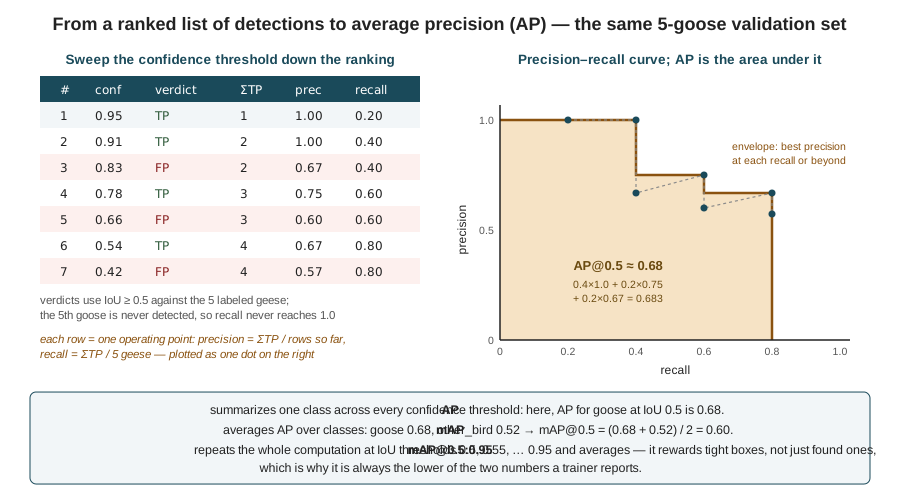
Two averaging steps turn AP into the numbers a training run actually prints. Averaging AP over classes gives mAP — if goose scores 0.68 and other_bird a weaker 0.52, then mAP@0.5 is 0.60 — a convention that matters when classes are imbalanced, since a detector can post a handsome average on the abundant class while quietly failing the rare one, which is a reason to always read the per-class table, not just the mean. Averaging over IoU thresholds gives the stricter mAP@0.5:0.95: the entire computation repeated at matching thresholds from 0.5 to 0.95 in steps of 0.05 and averaged, so that a detector earns full credit only when its boxes are not merely on the object but tight — which is why this is always the lower of the two numbers reported, and why sloppy training labels, which teach loose boxes, damage it first. When the validation call in the training snippet returns its four columns — precision, recall, mAP50, mAP50-95 — every one of them is now legible as a specific computation over TP, FP, and FN counts, and a statement like “the fine-tuned model reached 0.85 mAP@0.5” has become checkable engineering rather than incantation.
15.9 Closing the Loop
The validation table says how good the model is; it does not say why it is bad where it is bad, and the last discipline of the pipeline is extracting that answer. The method is unglamorous: run the trained detector over the validation set and over fresh footage, and look at the failures one by one. They will cluster — and each cluster is a sentence in the specification for the next dataset. Misses at long range: the dataset lacks small-scale geese, or the input resolution is below the pixels-on-target floor of the Images as Data chapter — collect high-altitude footage, or revisit the resolution negotiation. Ducks boxed as geese: the other_bird class is underpopulated — collect confusers. Failures against a specific background or lighting: a coverage gap, named precisely by the failing frames themselves. Small datasets guarantee such mistakes, and the correct response is neither despair nor another architecture, but the red arrow of Figure 15.1: mistakes are the cheapest, most accurate data-collection guidance the project will ever get. Even the deployed model keeps contributing — the TinyML chapter’s offloading pattern, shipping hard cases and low-confidence detections back from the aircraft as summaries, exists precisely to keep this loop turning after launch.
The pipeline is now complete end to end, in the only sense that matters: every stage from raw footage to a validated, deployable model has been built, and the two stages beyond — quantize, hand to TensorRT, run inside the Detector node — were the previous chapter’s work. Two threads remain open, both deliberate. The numbers this chapter computed were a worked miniature; the Wildlife Detection from the Air case study, which closes this Part, holds the whole pipeline against the published record — a real research team detecting sheep from 80 m, and the waterfowl literature’s own goose detectors — reading their datasets, labeling compromises, and reported failures with exactly the instruments built here. And a model that is accurate is not yet a model that is fast enough: proving the deployed detector meets its frame-rate deadline inside the aircraft’s stack is a measurement discipline of its own, taken up in the Real-Time Inference on the Edge chapter.
15.10 Check Your Understanding
- A labeler produces a box for a goose occupying pixels from \((u, v) = (200, 300)\) to \((280, 360)\) in a 640 × 480 frame. Write the YOLO-format label line (class
goose= 0), showing the arithmetic for all four coordinates.
The box’s center is at \(u_c = (200+280)/2 = 240\), \(v_c = (300+360)/2 = 330\); its width is 80 px and height 60 px. Normalizing: \(x_c = 240/640 = 0.375\); \(y_c = 330/480 = 0.6875\); \(w = 80/640 = 0.125\); \(h = 60/480 = 0.125\). The line is 0 0.375 0.6875 0.125 0.125. Note the divisor differs per axis — horizontal quantities are divided by the width (640), vertical by the height (480) — a mismatch here is a classic silent labeling bug that displaces every box vertically.
- On a validation set containing 40 labeled geese, a detector at confidence ≥ 0.5 reports 35 boxes, of which 28 match a goose at IoU ≥ 0.5. Fill in the confusion matrix (TP, FP, FN), compute precision and recall, and state — in mission terms for the running example — what each of the two error counts costs.
TP = 28; FP = 35 − 28 = 7; FN = 40 − 28 = 12 (TN is undefined for detection). Precision = 28/35 = 0.80: one alert in five sends the aircraft to investigate something that is not a goose — wasted battery and flight time. Recall = 28/40 = 0.70: 12 of the 40 geese present go undetected and undeterred — a direct failure of the mission’s purpose. For a deterrence mission the FN cost dominates, which argues for lowering the confidence threshold (trading precision away to recover recall) rather than raising it.
- Explain why a random frame-level split of video-derived data inflates validation metrics, why the inflation is invisible during development, and how the same failure mode reappeared in the previous chapter in a different pipeline stage.
Frames extracted seconds apart from one video are near-duplicates; a random split scatters them across both sides, so nearly every validation image has a close sibling in training and the model is scored partly on memorization. The inflation is invisible because every number the developer sees — computed on that contaminated validation set — is self-consistently high; the truth only surfaces on genuinely new footage, i.e., in the field. The TinyML chapter’s quantization-calibration failure is the same principle one stage later: a calibration set drawn from convenient (e.g., indoor) data yields activation ranges that look perfect on calibration data and clip catastrophically on flight data. In both cases held-out data is a measuring instrument, and it measures only what it was sampled from.
- A pretrained YOLOv8n detects the birds in the validation images but labels them all
bird. Fine-tuning on 130 labeled images produces a model that reliably distinguishesgoosefromother_bird. Explain, in terms of which layers change and what they encode, why 130 images suffice here when training the same architecture from random initialization would fail.
The pretrained network’s early convolutional layers already encode general visual features — edges, textures, part-like patterns — learned from a large general dataset; these transfer to the new task essentially unchanged, because low-level visual structure is shared across image domains. Fine-tuning mainly has to adjust the later layers and detection head, which compose those features into class evidence — teaching the (comparatively few) parameters that separate goose-shaped feature combinations from other-bird-shaped ones. 130 images carry enough information for that small adaptation, but nowhere near enough to constrain all 3.2 million parameters from scratch: with random initialization the network must learn edge detectors and class boundaries simultaneously from a dataset thousands of times too small, and it memorizes instead of generalizing.
- A detector’s ranked output on a validation set with 4 ground-truth geese is: 0.92 TP, 0.85 TP, 0.71 FP, 0.63 TP, 0.50 FP. Compute cumulative precision and recall at each rank, then AP@0.5 using the upper-envelope convention. What is the maximum recall, and why does it fall short of 1.0?
Ranks: (1) P = 1/1 = 1.00, R = 1/4 = 0.25; (2) P = 2/2 = 1.00, R = 0.50; (3) P = 2/3 = 0.67, R = 0.50; (4) P = 3/4 = 0.75, R = 0.75; (5) P = 3/5 = 0.60, R = 0.75. Envelope: precision 1.00 holds for recall in (0, 0.50] (best precision at or beyond those recalls is 1.00); precision 0.75 for (0.50, 0.75]; zero beyond 0.75. AP = (0.50)(1.00) + (0.25)(0.75) = 0.50 + 0.1875 ≈ 0.69. Maximum recall is 0.75: the fourth goose is matched by no detection at any confidence, and no threshold choice can recover an object the model never proposed.
- mAP@0.5:0.95 for a trained model comes back much lower than its mAP@0.5, and inspection shows the predicted boxes systematically include a margin of grass around each goose. Trace the likely cause backward through the pipeline, and state which pipeline stage — not which hyperparameter — the fix belongs to.
mAP@0.5:0.95 re-scores the same detections at IoU thresholds up to 0.95, so it punishes boxes that find the object but fit it loosely — precisely the symptom described. The model learned loose boxes because it was taught them: training annotations drawn with generous margins shift the box-geometry loss’s target, and the model reproduces the margin faithfully. The fix belongs to the labeling stage — re-audit the annotations against the tight-box convention and correct them — not to training hyperparameters, which would be tuning the optimizer to better fit wrong answers. The general lesson: metric pathologies whose pattern is systematic (every box loose in the same way) usually indict the dataset; random pathologies more often indict the model or the data volume.
15.11 Try It
Part 1 — build a labeled dataset and audit it. Collect two or three minutes of video containing a target class of your choosing (birds at a pond, cars from a footbridge — anything with multiple instances and confusers). Extract frames at a 2-second interval with the chapter’s snippet, cull the useless ones, and label 40–60 images in a browser tool (makesense.ai requires no installation), exporting in YOLO format. Before doing anything else, audit: write a short script that draws every label file’s boxes back onto its image, page through all of them, and count your own labeling errors — missed objects, loose boxes, class inconsistencies. Fix what you find, then write down your class-boundary rules (what did you decide about occluded, distant, or ambiguous instances?) as the labeling spec you should have written first. Finally, split by session, not by frame: hold out footage from a different time or vantage point if you have it, and state in one sentence what your validation set does and does not test.
Part 2 — train, evaluate, and compute one AP by hand. Fine-tune yolov8n.pt on your dataset for 50 epochs (any free GPU notebook service suffices) and run validation. First reproduce the baseline comparison: run the pretrained weights on your validation images, then your fine-tuned weights, and save one side-by-side pair that shows the difference. Then interrogate the metrics: from the validation output, read precision, recall, mAP@0.5, and mAP@0.5:0.95, and check the per-class table for imbalance. Finally, verify the machinery yourself: pick 8–10 of your model’s detections on a handful of validation images, determine each one’s TP/FP verdict at IoU ≥ 0.5 (compute one IoU by hand from box coordinates while you are at it), build the ranked table as in Figure 15.5, and compute AP with the envelope convention. Compare your hand-computed value against the framework’s per-class AP — and if they disagree wildly, find out which of you is matching detections to ground truth differently. That disagreement, run to ground, teaches more than the training run did.
Related Lab: See Appendix B for the lab assignment that applies this chapter’s concepts.