26 Post-Flight Diagnostics: Reading Logs and Debugging Flight Behavior
The previous chapter put the whole machine on the bench and closed with a warning: a graph this size fails in ways no single node’s chapter could show, and some of those failures can only be read backwards — from a log, after the flight, when the aircraft is on the ground and the question is no longer “what should it do?” but “what did it just do, and why?” This chapter teaches that reading. It is the natural continuation of the System Architecture chapter’s inventory, because everything that chapter named as a stream — the Flight Controller’s 5 Hz FcStatus aggregate, the Detector’s 10 Hz Target, the 1 Hz active-controller token, the Failsafe node’s SEVERITY:reason strings — is ephemeral by design. A topic asserts and moves on; nothing in the publish/subscribe contract keeps yesterday’s assertions. If the running example lands early, wobbling, with the crew unsure whether they saw a failsafe or a gust, the live graph has already forgotten. What remembers is a file.
Two files, in fact, and knowing which holds what is this chapter’s first lesson in miniature. On the companion computer, ros2 bag can record the /goose/* topics — the mission-level story, in the mission’s own vocabulary. But underneath the grey edges of the previous chapter’s node graph, PX4 has been keeping its own record the entire time, without being asked: from the moment the vehicle armed to the moment it disarmed, the autopilot’s logger wrote every uORB topic it is configured to keep — attitude, position, battery, IMU health, mode changes, and its own printf-style diagnostic messages — into one binary .ulg file on the SD card. That file is the closest thing a small aircraft has to the flight data recorder that commercial aviation has carried for decades, and this chapter treats it accordingly: first the format and the tools that open it, then the two diagnostic skills the file most repays — reading a vibration signature and reading a power trace — and finally the systematic workflow that turns a log full of symptoms into a hypothesis, a bench test, a fix, and a re-flight that proves the fix.
26.1 Learning Objectives
- Locate a PX4 flight log (
.ulg), explain the structure of the ULog format that makes the file self-describing, and usepyulog’s command-line tools (ulog_info,ulog_messages,ulog_params,ulog2csv) to extract a specific field — a voltage series, a vibration metric — from a real log. - Interpret the vibration diagnostics PX4 records in
vehicle_imu_status— accelerometer and gyroscope clipping counts and computed vibration metrics — and classify a frequency-domain vibration signature against Flight Review’s documented worked examples, from excellent through borderline to a resonance that grounds the aircraft. - Explain what a vibration signature indicates mechanically — propeller imbalance, loose hardware, frame or landing-gear resonance — and why the documented remediation order puts mechanical fixes before software filtering.
- Distinguish a voltage sag under load from genuine depletion in a logged
battery_statusseries, compute a pack’s internal resistance from the logged voltage and current excursions, and relate both to PX4’s three-tier battery failsafe (BAT_LOW_THR,BAT_CRIT_THR,BAT_EMERGEN_THR). - Describe and apply a systematic post-flight debugging workflow — log review, hypothesis, bench test, fix, re-fly — using named failure signatures (mechanical failure, GPS glitch, compass interference, brownout) as the vocabulary of hypotheses.
- Correlate the companion computer’s record (a ROS 2 bag, the Failsafe node’s logged
SEVERITY:reasonline) with the autopilot’s ULog on one timeline, and say which recorder is authoritative for which question.
26.2 Key Vocabulary
- Flight log — the record an autopilot writes of its own flight: for PX4, one
.ulgfile per arming session, holding timestamped sensor data, state estimates, parameter values, mode changes, and text diagnostics in a single binary stream. - ULog format — PX4’s self-describing binary log format: the file carries its own message-type definitions, so a parser needs no external schema; header, definitions, and data sections in sequence, little-endian throughout, every message stamped in microseconds.
- Black-box recorder — the aviation flight data recorder that is the
.ulgfile’s conceptual ancestor: a continuously running onboard recorder whose value lies both in reconstructing accidents and in routine review of uneventful flights. - Telemetry parsing — extracting specific fields from a recorded telemetry stream into an analyzable form — for a ULog, one
ulog2csvinvocation per topic of interest. - Vibration metric — a computed summary of high-frequency IMU disturbance; PX4 logs an accelerometer metric (m/s²) and a gyroscope metric (rad/s) in
vehicle_imu_status, alongside raw per-axis clipping counts. - Clipping (sensor) — a measurement that exceeded the sensor’s physical range: the vibration amplitude at that instant was literally unrepresentable, not merely large. Logged as running per-axis counts; any sustained growth is disqualifying.
- Blade-passing frequency — the rate at which propeller blades pass a fixed point: blade count times rotation rate, and the characteristic frequency at which propeller-induced vibration concentrates in a log’s spectrum.
- Voltage sag — the transient drop in a battery’s terminal voltage under load, equal to the drawn current times the pack’s internal resistance; it tracks the current trace and recovers when load drops, which is exactly how a log distinguishes it from depletion.
- Internal resistance — the effective series resistance of a cell, the mechanistic cause of sag; it rises with age and cold, and PX4 both estimates it in flight (
internal_resistance_estimate) and uses it to load-compensate the charge estimate. - Failure signature — a named, recognizable pattern in logged data that points to a specific cause: setpoint/actual divergence for mechanical failure, satellite-count drops for GPS glitches, throttle-correlated magnetometer drift for compass interference, abrupt mid-air log truncation for a brownout.
26.3 The Aircraft That Writes Its Own History
Commercial aviation settled this question long before drones existed: an aircraft must carry a record of its own behavior, because the alternative is reconstructing incidents from memory and wreckage. The flight data recorder — the “black box,” bright orange in practice so that searchers can find it — earns its keep twice over. After an accident it lets investigators establish what happened and why; and, at least as importantly, routine review of ordinary recorded flights lets an operator catch developing problems before they become accidents at all. The United States’ National Transportation Safety Board makes precisely this dual argument in advocating recorders for the aircraft classes that still lack them, noting that 83% of the turbine-powered aircraft in its 2005–2020 fatal-accident investigations carried no recording equipment whatsoever (National Transportation Safety Board 2021). The FAA’s Flight Operational Quality Assurance guidance extends the proactive half into a standing program: airlines routinely download and analyze recorder data from essentially every flight — not just the eventful ones — specifically to find safety trends early (Federal Aviation Administration 2004). That is the posture this chapter argues a drone program should inherit. The log is not something you open after a crash; it is something you glance at after every flight, because the flight before the failure often contains the warning.
PX4 makes the inheritance nearly free, because the recorder is already running. By default, PX4’s logger module starts when the vehicle arms and stops when it disarms, writing one new .ulg file per arming session to the SD card; other documented modes log from boot, gate logging on an RC switch, or run until shutdown, and the logger can be driven manually from the system console with logger on and logger off (PX4 Autopilot 2026f). What gets logged is configurable — a SDLOG_PROFILE parameter selects logging profiles, a plain-text logger_topics.txt file on the SD card can add topics or change rates, and parameters cap file size and rotate old logs off a filling card — but the out-of-the-box default set is deliberately chosen to support flight reporting and analysis without any configuration at all (PX4 Autopilot 2026f). Every flight of the running example that has flown in this book, real or simulated, has left one of these files behind.
26.3.1 What is in the file
The ULog format rewards a few minutes of attention, because its design decisions are exactly the ones a diagnostician benefits from. A .ulg file is three sections in sequence, drawn in Figure 26.1. A 16-byte header carries the magic bytes identifying the file, a format version, and the log’s start timestamp in microseconds. A definitions section makes the file self-describing: 'F' format messages declare the field names and types of every uORB message the log contains — so a parser needs no external schema files and a log remains readable years later, against any firmware version — alongside 'I' information messages (hardware and firmware versions) and 'P'/'Q' parameter messages recording every parameter value in force when logging started. Then the data section carries the flight: 'A' subscription messages binding each format to a numeric ID, 'D' logged-data messages holding the actual timestamped binary payloads, and — easy to miss, and disproportionately useful — 'L'/'C' logged-string messages, which is where PX4’s PX4_INFO()/PX4_ERR() printf-style diagnostics end up. The “system telemetry log,” in other words, is not a separate text file: the autopilot’s prose and its numbers share one file and one microsecond clock, which is what makes “what was the vehicle saying when the voltage dipped?” a single-file question. Finally, 'O' dropout messages mark periods where logging itself was interrupted — a diagnosis channel for SD-card and scheduling trouble, distinct from any flight anomaly. All of it is little-endian; every subscribable message carries a monotonically increasing uint64 microsecond timestamp; and a well-behaved parser is expected to skip unknown message types and resynchronize past corrupted data rather than abort — which is why a log truncated mid-write by a crash, the case where the file matters most, can usually still be partly read (PX4 Autopilot 2026i).
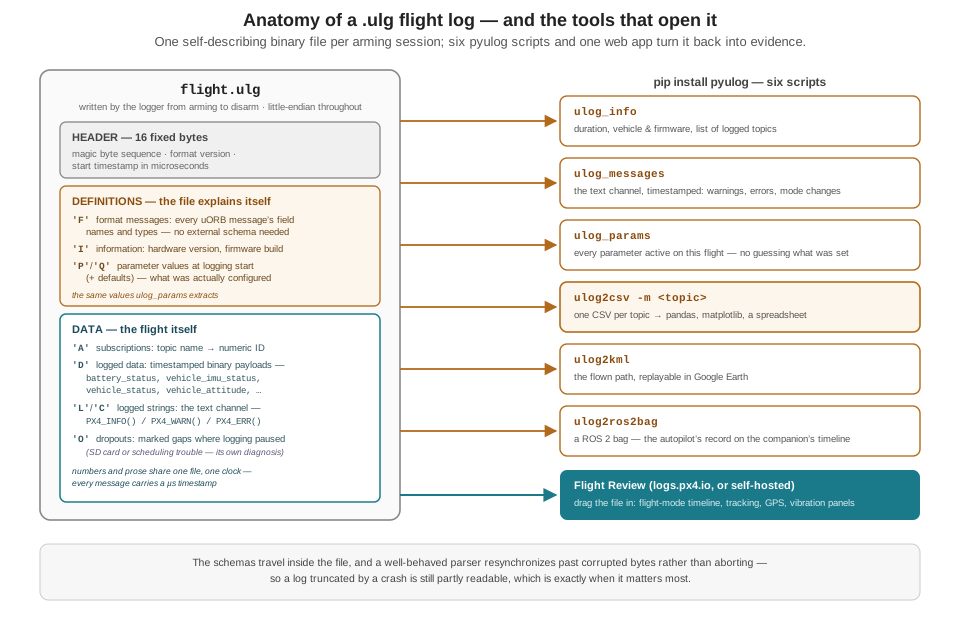
.ulg binary on the left, and the six pyulog command-line scripts plus the Flight Review web application that turn it back into metadata, text, parameters, CSVs, a flight path, and a ROS 2 bag on the right.
26.4 Opening the Log
The reference GUI for a .ulg file is Flight Review, PX4’s own web application: drag the file onto logs.px4.io (or run a local instance from the open-source repository, which needs no upload at all (PX4 Autopilot 2026d)) and it renders an interactive panel set — a timeline colored by flight mode, controller tracking plots of estimated-versus-setpoint attitude, actuator outputs, GPS quality, and a dedicated vibration section this chapter leans on below (PX4 Autopilot 2026e). The documentation itself cautions that interpreting these plots “requires experience to understand acceptable ranges” — log reading is a skill, not a button — and building that experience against known-good and known-bad examples is exactly what the rest of this chapter does. For ad hoc work outside Flight Review’s fixed panels, the same official tool roundup lists PlotJuggler and Foxglove, both with native ULog support, as general-purpose drag-and-drop plotting environments (PX4 Autopilot 2026c).
But the tool that best teaches what all of these are doing under the hood is pyulog, PX4’s official Python package (pip install pyulog), which ships six command-line scripts (PX4 Autopilot 2026g). A complete first pass over an unfamiliar log is four commands:
pip install pyulog
ulog_info flight.ulg           # duration, vehicle, firmware, topic list
ulog_messages flight.ulg       # the text channel: timestamped INFO/WARN/ERR
ulog_params flight.ulg         # every parameter active during this flight
ulog2csv -m vehicle_imu_status,battery_status flight.ulg
ulog_info answers the orientation questions — how long did the log run, which airframe, which firmware, which topics are present. ulog_messages dumps the logged strings with timestamps and severity: this is “parsing the system telemetry log” reduced to one command, and it is where a mode change, an arming refusal, or a firmware complaint announces itself in words. ulog_params recovers the configuration that was actually in force — not what anyone remembers setting — which settles a whole class of arguments before they start (“was the critical-battery threshold really at 10%?” is a lookup, not a debate). And ulog2csv converts chosen topics to one CSV file each: vehicle_imu_status_0.csv arrives with per-axis clipping counts and the vibration metrics as plain columns, battery_status_0.csv with voltage, current, and the warning level. Two further converters round out the set: ulog2kml renders the flown path for Google Earth, and ulog2ros2bag converts the ULog into a ROS 2 bag (PX4 Autopilot 2026g).
That last converter deserves a beat, because it resolves the two-recorders question this chapter opened with. The ULog records the autopilot’s world — the uORB topics below the grey bridge edges of the previous chapter’s node graph. The /goose/* mission topics — the token, the Target stream, the Failsafe node’s SEVERITY:reason strings the Geofencing and Fail-Safes chapter defined — live on the companion computer and are captured, if at all, by ros2 bag. Each recorder is authoritative for its own layer: the ULog for what the vehicle physically did and what PX4 believed and commanded; the bag (and the nodes’ own logged output) for what the mission logic decided and why. ulog2ros2bag puts both records into one format on one timeline, so “the watchdog logged FAILSAFE: RTL:geofence breach at 14:02:31 — did PX4’s mode actually change, and when?” becomes a mergeable, answerable question rather than two files squinted at side by side.
For programmatic work, the same package is a library, and the CSV step can be skipped entirely:
"""Pull the power and vibration series out of a ULog for plotting."""
import matplotlib.pyplot as plt
from pyulog import ULog

log = ULog('flight.ulg',
           message_name_filter_list=['battery_status',
                                     'vehicle_imu_status'])

batt = log.get_dataset('battery_status').data
imu  = log.get_dataset('vehicle_imu_status').data

fig, (ax_v, ax_i, ax_vib) = plt.subplots(3, 1, sharex=True)
t_b = batt['timestamp'] / 1e6            # microseconds -> seconds
ax_v.plot(t_b, batt['voltage_v']);  ax_v.set_ylabel('pack V')
ax_i.plot(t_b, batt['current_a']);  ax_i.set_ylabel('A')

t_i = imu['timestamp'] / 1e6
ax_vib.plot(t_i, imu['accel_vibration_metric'])
ax_vib.set_ylabel('accel vib (m/s$^2$)'); ax_vib.set_xlabel('t (s)')
plt.show()
Nine lines of real work, and the two traces the next two sections teach you to read are on the screen. Everything Flight Review plots is, in the end, this: a dataset pulled from the file by name, against the file’s own microsecond clock.
26.5 Reading Vibration: The Airframe’s Mechanical Signature
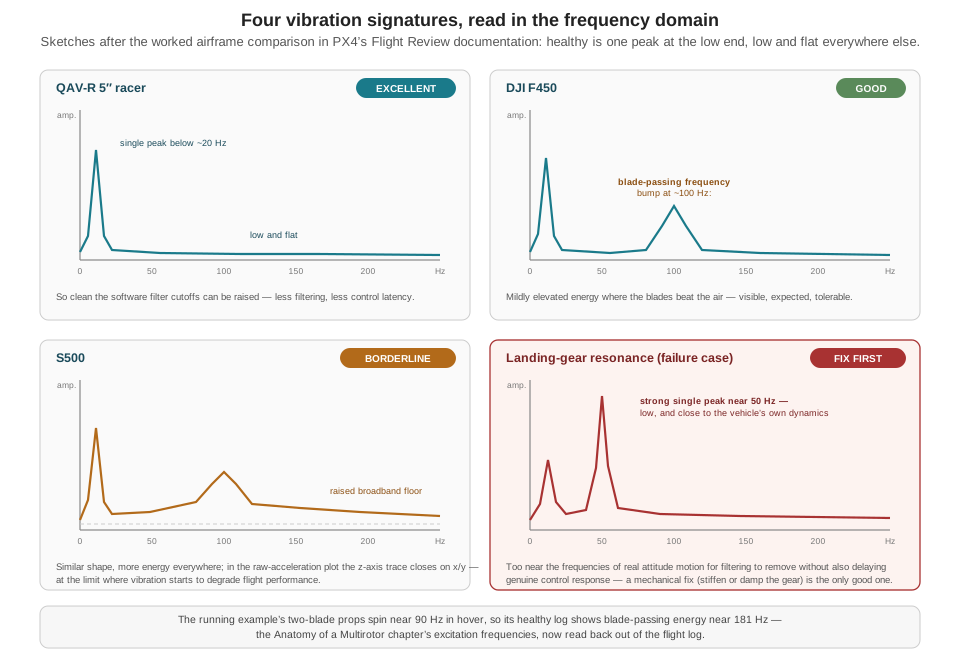
The Anatomy of a Multirotor chapter established the physics this section now reads back out of the log: every propeller injects excitation at its rotation rate and at the blade-passing frequency — about 90 Hz and 181 Hz respectively for the running example’s two-blade props at hover RPM — and an IMU is a micromechanical resonator that suffers under exactly that excitation, up to and including the vibration-rectification bias the Sensing the World chapter derived. The flight log is where that physics stops being theoretical. PX4’s documentation is blunt about the stakes: high vibration is linked to inefficient flight, motor overheating, material wear, tuning difficulty, sensor clipping, and — the endpoint that makes this a safety topic rather than a comfort topic — corrupted position estimation that can produce fly-aways (PX4 Autopilot 2026k). Vibration diagnosed in a log after a wobbly flight is a crash prevented; the same signature ignored is a crash scheduled.
26.5.1 What the log records
The message to pull is vehicle_imu_status, logged per IMU instance by default. Its documented diagnostic fields come in two kinds (PX4 Autopilot 2026j). The clipping counts — accel_clipping[3] and gyro_clipping[3], running per-axis totals — count the moments when the raw sensor’s measurement range was exceeded: not “vibration was high” but “the physical amplitude was literally unrepresentable.” Clipping is the binary red flag; a counter that grows during flight means the estimator was intermittently blind on that axis, and no software filter downstream can recover information the sensor never captured. The vibration metrics — accel_vibration_metric in m/s² and gyro_vibration_metric in rad/s — are PX4’s computed summaries of high-frequency disturbance since the last publication, the analog quantity to the clipping counters’ digital one, with per-axis means and variances alongside as coarser proxies. For the deepest analysis — choosing an isolation mount, tuning a notch filter — PX4 supports full-rate raw IMU logging at several kilohertz via SDLOG_PROFILE’s FIFO profiles, precisely because the default logged rate averages away the high-frequency content those decisions turn on (PX4 Autopilot 2026e).
26.5.2 What good and bad look like
Summary metrics say how much; the frequency domain says what kind, and kind is what points at a mechanical cause. Flight Review’s vibration section offers three views (PX4 Autopilot 2026e): an FFT of the actuator control signal (requires high-rate logging), where a healthy airframe shows a single peak at the low end — below roughly 20 Hz, the band of genuine vehicle motion — with everything above it low and flat; an acceleration power spectral density heatmap over time, healthy when it is mostly green with a little yellow confined to the lowest few hertz, and disqualifying when it is almost completely yellow — the documentation’s own line for vibration levels too high to fly with; and the raw acceleration traces, with a memorable rule of thumb: in hover, gravity holds the z-axis trace well apart from x and y, so if z is touching x/y during hover or slow flight, vibration is too high.
What makes this teachable rather than abstract is that PX4’s documentation walks the comparison across three real, named airframes, and Figure 26.2 sketches the four signatures side by side. The QAV-R 5″ racer is the reference: one low peak, flat spectrum, clean heatmap, z well separated — so clean that the documentation’s verdict is that the software filter cutoffs can be raised, trading now-unneeded filtering for lower control latency. The DJI F450 is good with a visible flaw: the same low peak plus a bump near 100 Hz, which the documentation identifies as the blade-passing frequency — the propellers’ beat, showing through mildly and tolerably. The S500 is the borderline case: a similar spectral shape but more energy throughout, and in the raw traces the z-axis rides close to x/y — documented as at the limit where vibration starts to negatively affect flight performance. And the fourth panel is the documented failure case: a landing-gear vibration problem appearing as a strong single peak close to 50 Hz — flagged as concerning precisely because it is strong, single, and low, close to the vehicle’s own dynamics, where a filter aggressive enough to remove it would also delay response to genuine attitude motion (PX4 Autopilot 2026e). Frequency is the diagnosis: energy at blade-passing frequency indicts the propellers; energy at once-per-revolution indicts rotating balance — a bent shaft or a damaged prop hub produces exactly that narrow low peak, the same signature class as the imbalance cases the documentation names; and a strong narrow peak that tracks neither motor frequency is a structure resonating, like that landing gear.
26.5.3 From signature to wrench
A signature is only useful if it dispatches to a fix, and PX4’s vibration-isolation guidance supplies both the catalog and the priority order (PX4 Autopilot 2026k). The mechanical causes it names are the ones the spectra above finger: imbalanced or low-quality propellers, motors, and ESCs; loose airframe hardware — landing gear and GPS masts are called out specifically — rattling as secondary resonators; and frame resonance at the autopilot’s own mounting location, which well-designed frames damp and poorly designed or damaged ones amplify. The priority order is the part worth internalizing as doctrine: reduce vibration at its source before filtering it in software. Balance the propellers, tighten every fastener, replace the worn motor, add isolation mounting — and only then reach for lower filter cutoffs or additional notches, because software filtering spends control latency to hide a mechanical problem that is still there, still heating motors and fatiguing the frame. This is the same layered defense the Sensing the World chapter listed for vibration rectification, now driven by evidence: the log tells you which layer to reach for, because a blade-passing bump and a 50 Hz gear resonance and a climbing clip counter are three different work orders.
26.6 Reading Power: Sag, Depletion, and the Three-Tier Ladder
The second trace every post-flight review should touch is power, and the log gives it to you as a correlated pair: battery_status.voltage_v and battery_status.current_a, sampled together, with the estimator’s own conclusions alongside — remaining as a 0–1 fraction of capacity, time_remaining_s as a prediction at recent load, a warning level that steps through WARNING_LOW, WARNING_CRITICAL, and WARNING_EMERGENCY as thresholds are crossed, and, remarkably, internal_resistance_estimate, PX4’s live per-cell estimate of the one parameter that governs everything in this section (PX4 Autopilot 2026b).
The physics is the Materials and Power chapter’s, one sentence of it: a battery’s terminal voltage under load is its open-circuit voltage minus the drawn current times its internal resistance — PX4’s battery-estimation documentation states the mechanism in exactly those terms, the internal resistance causing a voltage drop that reduces the measured output voltage relative to the no-load value (PX4 Autopilot 2026a). In a log, that mechanism has an unmistakable shape, drawn in Figure 26.3: the voltage trace dips when the current trace spikes and recovers when it drops. That is sag — a statement about resistance, not about how much energy remains. Depletion is the other motion in the same trace: the slow, one-way descent of the resting voltage between loads as capacity is actually consumed. The whole art of reading a power trace is refusing to confuse the two, and the log makes the distinction computable, because voltage and current are logged together.
26.6.1 A worked example: is this pack sick?
Take a real excerpt shape from a search leg of the running example. Cruising the survey grid at the mission draw the book has carried since Part I (~365 W on the 4S pack, about 25 A), the log shows voltage_v near 15.1 V — mid-plateau. At the transition into an engagement climb, current spikes to 65 A and the voltage dips to 14.3 V, recovering as the climb ends. Is that alarming? Compute what the pair of excursions actually measures:
\[ \begin{aligned} R_{\text{int}} &= \frac{\Delta V}{\Delta I} = \frac{15.1 - 14.3}{65 - 25}\ \text{V/A} \\ &= \frac{0.8}{40}\ \Omega = 20\ \text{m}\Omega\ \text{(pack)} \\ &= 5\ \text{m}\Omega\ \text{per cell (4S)} \end{aligned} \]
Five milliohms per cell is a healthy LiPo — it matches both the Materials and Power chapter’s fresh-cell figure and the typical value PX4’s own documentation cites for its manual internal-resistance parameter (PX4 Autopilot 2026a). The under-load reading of \(14.3/4 \approx 3.58\) V per cell also clears the documented real-world under-load minimum of 3.5 V per cell for LiPo (the same page’s table: 3.7 V/cell as the conservative no-load minimum, 3.5 V/cell as the realistic minimum under load, 3.0 V/cell as the damage threshold; lithium-ion chemistry runs lower at 3.0/2.7/2.5) (PX4 Autopilot 2026a). Verdict: an unremarkable sag on a healthy pack under a hard but legitimate load.
Now age the pack to the Materials and Power chapter’s worn-out figure, 15 mΩ per cell — 60 mΩ across the pack — and replay the same climb. The dip becomes \(40 \times 0.060 = 2.4\) V: the same maneuver now reads \(15.1 - 2.4 = 12.7\) V, or about 3.2 V per cell — below the 3.5 V under-load floor and brushing the 3.0 V damage threshold — while the resting voltage between maneuvers still sits placidly mid-plateau. This is the signature of the pack that “flies gentle missions convincingly and fails exactly when full performance is demanded”: nothing about its state of charge is wrong; its resistance is. And it is why PX4’s charge estimator does not take the sagged voltage at face value. The documentation describes three progressively better estimation strategies — raw voltage comparison, explicitly coarse because sag is uncompensated; load compensation, which uses the simultaneous current measurement and the internal-resistance estimate (or the manually configured value) to correct the reading back toward open-circuit; and current-integration fused with the voltage estimate, with accuracy the docs compare to smart batteries (PX4 Autopilot 2026a). Internal resistance is not a constant, the same page notes: it moves with temperature during a flight and grows as the pack ages — which is precisely why the logged internal_resistance_estimate series is itself a diagnostic: a pack whose estimate trends upward flight over flight is announcing its retirement on a schedule you can read.
26.6.2 The three-tier ladder in the log
What the failsafe machinery watches is not the sagging instantaneous voltage but the load-compensated remaining fraction, and PX4’s safety configuration hangs three thresholds on it in strictly decreasing order: BAT_LOW_THR, the warn level, which notifies and nothing more; BAT_CRIT_THR, the failsafe level, which triggers the configured action; and BAT_EMERGEN_THR, the emergency level, which triggers a more severe one. The overall action is selected by COM_LOW_BAT_ACT, whose documented recommended default is “Return then Land” — Return-to-Launch at the critical level, unconditional landing at the emergency level — with warning-only, land-at-critical, and a parachute-oriented “Return then Terminate” as the documented alternatives; when several failsafes are active at once, PX4 executes the single most severe applicable action. Two adjacent parameters complete the picture: COM_ARM_BAT_MIN refuses to arm below a floor, and COM_FLT_TIME_MAX bounds total flight time outright, a belt-and-suspenders limit independent of the charge model (PX4 Autopilot 2026h). The same configuration page carries an easily missed field note: the ESC’s own low-voltage cutoff should be disabled or set below PX4’s empty threshold, so that the autopilot’s graded logic — not an ESC reacting to one sagged instantaneous reading — governs what happens as voltage falls (PX4 Autopilot 2026a).
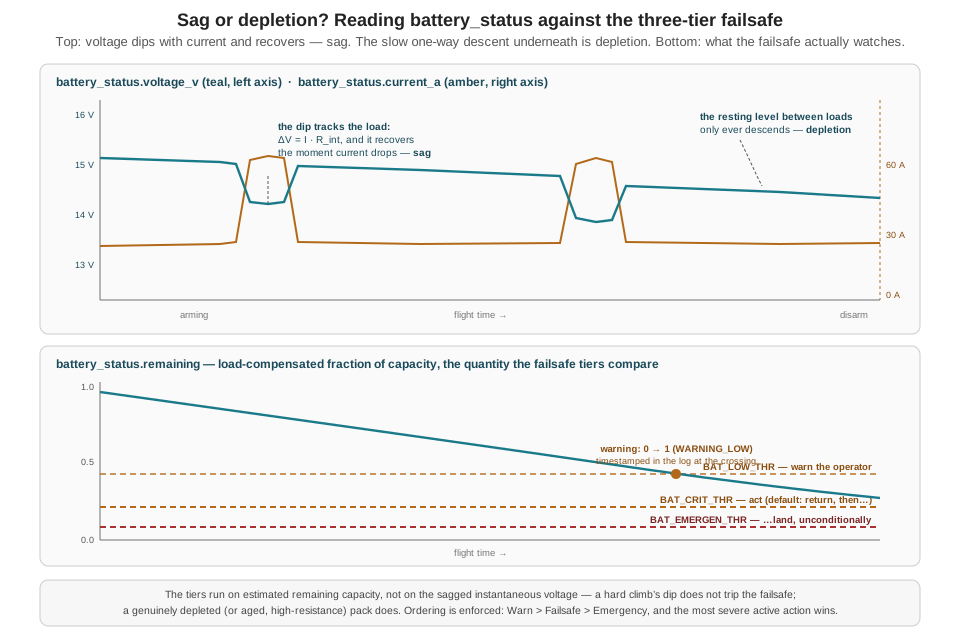
warning field transition timestamped at the crossing.
The diagnostic payoff of the ladder is that its rungs are timestamped into the log. When remaining crosses the critical threshold, battery_status.warning steps from WARNING_LOW to WARNING_CRITICAL at a specific microsecond, and PX4’s commanded response lands in the mode-change record moments later — so “did the battery failsafe fire where the battery data says it should have?” is a two-column correlation, not an inference. The running example adds its own rungs above the firmware’s, as the Geofencing and Fail-Safes chapter built them: the Failsafe node compares this very remaining field against its battery_rtl (0.30) and battery_land (0.15) parameters — deliberately far above PX4’s own defaults — and publishes RTL:battery below mission threshold or LAND:battery below land floor when they trip. A healthy mission’s post-flight record therefore shows the mission thresholds acting and the firmware tiers never reached; a log in which WARNING_CRITICAL appears at all is evidence that a whole mission-layer margin was somehow consumed or bypassed, and that is a finding even when the flight ended safely.
26.7 A Systematic Debugging Workflow
Everything so far is instrumentation. What turns instrumentation into engineering is a loop, and the loop this chapter recommends is the standard troubleshooting cycle of any experimental discipline, applied to flight: log review → hypothesis → bench test → fix → re-fly (and re-review — the loop closes only when the new log shows the signature gone). Neither PX4 nor any other autopilot project hands down this five-step loop as named doctrine; what the documentation supplies is the two ingredients the loop runs on — an ordered first-pass checklist, and a vocabulary of named failure signatures precise enough to be hypotheses.
The first pass is PX4’s own, from its flight-log-analysis guide (PX4 Autopilot 2026c). One: establish that the log actually captured the event — did logging run through the anomaly, or stop short of it? (A log that ends before the incident is itself a finding; see brownouts, below.) Two: check controller tracking — plot estimated attitude and rate against their setpoints, the comparison Flight Review draws automatically. The guide presents setpoint-versus-actual as the single easiest lens for whether a subsystem misbehaved: a controller tracking its setpoints faithfully while the aircraft misbehaved points the investigation upstream, at the setpoints’ author — which, for the running example in an engagement, means the mission layer’s Offboard stream, not the autopilot. Three: validate the sensors, vibration explicitly included, with a rough documented guideline that peak-to-peak accelerations beyond 2–3 m/s² warrant a closer look. Four: for hardware-level failures, check the second, lower-level log — PX4 flight controllers can write separate fault_[date].log files recording processor-level hardware faults, a channel independent of the ULog itself.
The hypothesis vocabulary is where a comparison source earns its place. ArduPilot — the other major open-source autopilot, whose DataFlash log format and message names differ from PX4’s throughout — publishes a diagnostics page that is exactly the artifact this step needs: six common failure categories, each with a named log signature and, where applicable, a numeric threshold (ArduPilot Dev Team 2026). The book’s system is PX4-based, and none of ArduPilot’s field names or numbers applies to a .ulg file directly; the page is presented here as a debugging-methodology exemplar, because the diagnostic logic transfers even where the fields do not. Its categories, with the transferable logic stated in PX4 terms where PX4’s own documentation supports it:
| Signature in the log | Hypothesis | Transferable logic |
|---|---|---|
| Sudden divergence of desired vs. actual roll/pitch | Mechanical failure — motor, ESC, or propeller loss | The setpoint/actual lens PX4’s own checklist teaches; on PX4, the attitude and attitude-setpoint streams |
Vibration beyond documented bands (ArduPilot: VIBE < 30 m/s² acceptable, > 60 m/s² nearly always causes position problems) |
Mechanical imbalance or resonance | The shape of a graded numeric judgment — ArduPilot’s numbers are for its own metric and do not port to PX4’s accel_vibration_metric; PX4’s equivalents are the airframe comparisons above |
| Satellite count drops, dilution-of-precision rises (ArduPilot: HDOP ≤ 1.5 very good, > 2.0 poor), position steps, then an aggressive “correction” | GPS glitch — the vehicle chases an error it believes is displacement | Satellite count and accuracy figures are logged by PX4’s GPS telemetry too; the step-then-lunge shape is the tell in either stack |
| Magnetometer trace that follows the throttle/current trace instead of actual heading changes | Compass interference from the vehicle’s own power wiring | The correlation test is stack-agnostic: heading sensors should not know what the motors are doing |
| Log terminates abruptly mid-air; board supply-voltage telemetry swings beyond a normal band (ArduPilot documents 0.10–0.15 V as normal variation) | Brownout — the flight controller’s own regulated rail glitched | Distinct from pack sag: a sag is a smooth, recovering curve in a continuing log; a brownout is the log ending |
| Dedicated error/failsafe records with subsystem codes | An unexpected failsafe fired | On PX4: ulog_messages output and the logged failsafe/warning fields — the moment and reason, timestamped |
Two rows repay a second look. The GPS-glitch row is the archetype of a signature that predicts behavior: in an autonomous position-holding mode, a sudden position error convinces the vehicle it has been displaced, and the controller commands an aggressive correction toward where it wrongly believes it should be — so the log shows cause (satellite drop, accuracy spike, position step) and effect (a lunge no one commanded) in adjacent streams (ArduPilot Dev Team 2026). PX4 logs the corresponding GNSS quality and estimator-health information in its own GPS and estimator status streams; the field-level mapping is left as documented general practice rather than recited here, but the shape of the signature — discontinuity in the believed position, followed by a vigorous correction — is what to hunt for in any stack. And the brownout row completes a distinction this chapter has been building: “a power problem in the log” can mean the flight battery sagging — the smooth, recovering dip in voltage_v the previous section read — or the flight controller’s own 5 V rail glitching, which does not draw a curve at all; it truncates the file, mid-air, with no disarm event. One is diagnosed by reading the trace, the other by noticing where the trace stops.
With a hypothesis named, the rest of the loop is deliberately boring. Bench test: reproduce the mechanism on the ground where it is cheap — spin the suspect motor with the props off and feel the bearing; balance the accused propeller; put the aged pack under a load tester and measure the resistance the log estimated; power the compass rail and watch the magnetometer while stepping motor current. Fix what the bench confirms — and here PX4’s mechanical-first doctrine from the vibration section generalizes: fix causes before compensating for them. Re-fly the same profile, and re-read the new log against the old one: the QAV-R/F450/S500 comparison exists because someone flew comparable flights on different hardware and kept the files, and your before-and-after pair is the same method pointed at one aircraft. A fix that cannot be seen in the next log is a fix you cannot prove happened — which is the FOQA lesson again, in miniature: the value of a log archive is comparative, and it only exists if the uneventful flights were kept too.
Flight Review’s public instance at logs.px4.io doubles as a browsable database of real-world .ulg uploads — a ready supply of unfamiliar logs to practice the first-pass checklist on. For vibration work beyond the default logged rates, PX4’s high-rate FIFO logging profiles (SDLOG_PROFILE) capture raw IMU samples at several kilohertz, the input a proper spectral analysis or notch-filter tuning session needs (PX4 Autopilot 2026e). And for multi-topic ad hoc plotting that Flight Review’s fixed panels don’t cover, PlotJuggler and Foxglove both open .ulg files natively (PX4 Autopilot 2026c).
26.8 Check Your Understanding
- A crash ends a flight — and the aircraft’s power — mid-write, leaving a truncated
.ulgfile. Explain two properties of the ULog format that make this file substantially recoverable anyway, and name the section of the file where you would look for PX4’s own last words (and thepyulogtool that prints them).
First, the format is self-describing: the definitions section — written at the start of the file, before any flight data — carries every message’s field names and types plus the full parameter set, so whatever data section survives can be parsed without external schemas. Second, parsers are expected to handle corruption gracefully: rather than aborting at the first damaged byte, a well-behaved ULog reader resynchronizes and continues, so everything up to the truncation (and past isolated corruption) is readable. PX4’s own diagnostic prose — PX4_INFO/PX4_WARN/PX4_ERR output — lives in the logged-string ('L'/'C') messages of the data section, on the same microsecond clock as the numeric streams, and ulog_messages flight.ulg prints it with timestamps and severities. (If the truncation itself is the mystery, the separate fault_[date].log hardware-fault files are the second place to look.)
- A logged 4S LiPo flight shows
voltage_v= 14.9 V at a cruise draw ofcurrent_a= 8 A, and 13.9 V during a 30 A climb. Compute the pack and per-cell internal resistance, compare against a healthy cell’s ~5 mΩ, evaluate the under-load per-cell voltage against the documented LiPo thresholds, and give the verdict: sagging-but-healthy, aged, or depleted?
\(R_{\text{int}} = \Delta V / \Delta I = (14.9 - 13.9)/(30 - 8) = 1.0/22 \approx 45\) mΩ for the pack, ≈ 11 mΩ per cell — roughly double a healthy cell’s ~5 mΩ. Under load the cells sit at \(13.9/4 \approx 3.48\) V, marginally below the documented 3.5 V/cell realistic under-load minimum (though far from the 3.0 V damage threshold). Is it depleted? Load-compensate: the open-circuit equivalent is \(13.9 + 30 \times 0.045 \approx 15.3\) V ≈ 3.8 V/cell — mid-plateau, plenty of charge. Verdict: not depleted but aged (or very cold): elevated internal resistance is making legitimate loads read like emergencies. The fix is a battery-bench decision — warm, load-test, and likely retire the pack — not a mission-threshold change.
- On an airframe whose two-blade propellers turn about 6,000 RPM in hover, a high-rate log’s FFT shows peaks at 100 Hz and 200 Hz. Identify the likely source of each peak, name the mechanical check each one dispatches to, and explain why a strong single peak at 50 Hz — not matching either motor frequency — would be a more troubling finding than both.
6,000 RPM is 100 Hz of shaft rotation, so the 100 Hz peak is once-per-revolution energy — rotating imbalance: check propeller balance, hub damage, and motor shaft/bearing condition. Two blades pass at twice shaft rate, so 200 Hz is the blade-passing frequency — the propellers beating the air, expected at modest amplitude (the F450’s documented ~100 Hz bump is this same feature at that airframe’s lower RPM). A strong 50 Hz peak matching neither frequency indicates something else resonating — the documented landing-gear failure case is exactly this — and it is worse for two reasons: it points to a structural resonance that will not be fixed by balancing anything, and it sits low, close to the frequencies of genuine vehicle dynamics, where a software filter aggressive enough to remove it would also delay real control response. The remedy is mechanical — stiffen or damp the resonating structure — per the documented reduce-the-source-first priority.
- A teammate reads that vibration under 30 m/s² is acceptable and over 60 m/s² nearly always causes position-hold problems, and proposes wiring those numbers into a script that flags the running example’s logged
accel_vibration_metric. What is wrong with the proposal, and what should the script compare against instead?
Those thresholds are ArduPilot’s, documented for ArduPilot’s own VIBE message — a differently computed quantity on a different scale in a different log format. PX4’s accel_vibration_metric is not the same measurement, so the numbers do not port; treating them as universal constants is exactly the citation-across-systems error a diagnostician must not make. What transfers is the shape of the judgment — a graded numeric band from fine through suspect to disqualifying. For a PX4 log, the script should use PX4-native references: growing accel_clipping/gyro_clipping counts (range exceeded — disqualifying), the documented ~2–3 m/s² peak-to-peak first-pass guideline, the raw-trace z-touching-x/y hover test, and, best of all, the aircraft’s own baseline — the metric’s values from known-good flights of the same airframe, which is the comparison Flight Review’s worked airframe examples model.
- Reviewing a mission’s records, you find the companion computer’s log contains the Failsafe node’s single line
FAILSAFE: RTL:geofence breachat 14:02:31, per the Geofencing and Fail-Safes chapter’s latching protocol. List what you would expect to find in the ULog around that timestamp if the override executed correctly, and explain which questions only the ULog can answer and which only the companion-side record can.
In the ULog, seconds after 14:02:31: a commanded mode change to Return-to-Launch in the vehicle-status/mode record (the Mission Manager’s _enter_failsafe parses RTL, zeroes the token, and calls the flight controller’s RTL service, which the Flight Controller verifies against PX4 telemetry), plus position telemetry showing the vehicle at or beyond the configured radius just before, and a homeward track after; ulog_messages may also show mode-change text. Only the ULog can answer physical-truth questions: where the vehicle actually was, when the mode actually changed, what the battery and estimator were doing — it is the autopilot’s own record, immune to companion-side bugs. Only the companion record can answer intent questions: why the override fired (the SEVERITY:reason string), what the watchdog’s thresholds were, which behavior node held the token, what the mission state machine did — none of the /goose/* topics exists in the ULog. Correlating the two (one timeline, e.g., via ulog2ros2bag) is the only way to check the full chain: condition detected → token revoked → service called → PX4 mode actually changed.
- Two logs both end with the aircraft on the ground unexpectedly. Log A runs to a normal disarm; its
voltage_vshows deepening dips during maneuvers in the last two minutes, andwarningreachesWARNING_CRITICALbefore an automatic return. Log B simply stops at 471 seconds, mid-air, with no disarm event and unremarkable battery voltage throughout. Give the leading hypothesis for each, and the bench test each one dispatches to.
Log A is a battery-side story told to completion: worsening sag (rising effective internal resistance as the pack empties and heats, and dips deepening as remaining falls) until the load-compensated estimate crossed BAT_CRIT_THR, stepping warning to WARNING_CRITICAL and triggering the configured return — the recorder captured cause, threshold crossing, and response, all timestamped. Bench test: load-test the pack, measure internal resistance against the log’s own internal_resistance_estimate, check cell balance; the fix is pack management (retire, warm, or resize), not software. Log B is the brownout signature: an abrupt mid-air log truncation with a healthy flight battery points at the flight controller’s own regulated supply rail, a different failure with a different mechanism — the recorder itself lost power, so the evidence is the absence of data. Bench test: power the flight controller through its actual harness, exercise peak loads (all peripherals, servo/ESC transients), and watch the board’s supply-voltage telemetry for excursions beyond normal variation; also inspect the power-module wiring and connectors. Checking the separate hardware fault log for a processor-level record is the corroborating step.
26.9 Try It
Part 1 — the routine review, made routine. Fly the running example’s mission (or any Part II mission) in SITL — the simulator’s PX4 writes the same .ulg files a real flight controller does; find the newest one under the SITL working tree’s log directory, or download it from QGroundControl’s log list. Then produce a two-page post-flight report using only this chapter’s tools. Page one, vibration: ulog2csv -m vehicle_imu_status (or the pyulog snippet), plot both vibration metrics and all six clipping counters over time, and classify the flight against the chapter’s criteria — any clipping growth, metrics steady or trending, and (if you enable high-rate logging and hover deliberately for thirty seconds) where the spectral energy sits relative to your airframe’s rotation and blade-passing frequencies. Page two, power: plot voltage_v and current_a on shared time, mark every sag excursion, compute \(R_{\text{int}}\) from the largest one, and plot remaining beneath with the three tier values you recover from ulog_params (look up BAT_LOW_THR, BAT_CRIT_THR, BAT_EMERGEN_THR, and check COM_LOW_BAT_ACT) drawn as horizontal lines. Upload the same file to Flight Review and check your plots against its panels — you should now be able to say what every panel is showing and where its data lives in the file. Keep the report: it is flight one of your baseline archive, and the comparison target for everything that follows.
Part 2 — diagnose an injected fault from the log alone. Have a partner (or your future self, a week from now) prepare a SITL flight with exactly one fault injected, without telling you which: an aged battery (raise the simulated pack’s internal resistance or cut its capacity), a vibration problem (if your setup exposes IMU noise/vibration simulation parameters), a GPS degradation (PX4’s SITL failure injection can cut or degrade GNSS mid-flight when the failure-injection parameter is enabled), or a mission-layer event (a mid-flight geofence tightening that trips the running example’s watchdog). You get the .ulg file — plus the companion-side log if the mission stack was up — and nothing else. Run the full loop in writing: the first-pass checklist (did the log capture it? does the controller track its setpoints? do the sensors validate?), the signature hunt against Table 26.1 and this chapter’s traces, a named hypothesis, and the bench test you would run on real hardware to confirm it. Only then compare against what was actually injected. Score yourself not on the guess but on the chain: a wrong hypothesis reached by defensible reading of real evidence is worth more than a right one reached by luck — and either way, finish the loop: state the fix, re-fly the corrected configuration, and show the before/after pair of logs with the signature gone.
Related Lab: See Appendix B for the lab assignment that applies this chapter’s concepts.
The previous chapter assembled the machine; this one taught it to testify. A program that reviews its logs after every flight — not just the frightening ones — is running the same discipline aviation formalized decades ago, and it accumulates the one asset no amount of cleverness substitutes for: a baseline, against which the next anomaly is visible early and provably fixed. What the log cannot testify to is whether the flight should have happened at all — what a system that autonomously pursues wild animals owes the animals, the public, and the law is an account no telemetry stream records, and rendering it is the work this Part turns to next.