11 Mission Scripting: Waypoints, State Machines, and Software-in-the-Loop
The previous chapter ended with a working mission node and two honest confessions about it. The node flew its square on a timer, advancing to the next corner when a stopwatch expired rather than when the vehicle arrived — a scheme that works exactly until the first gust of wind makes the schedule and the aircraft disagree. And the whole program had, so far, flown nowhere: the chapter closed by declaring the simulate-then-fly rule and deferring the simulator itself. This chapter pays both debts. It stands up the software-in-the-loop environment — PX4, Gazebo, and QGroundControl running together on one desk — and then rebuilds mission logic properly: waypoints as data with a real arrival test instead of a stopwatch, and the mission itself as an explicit state machine instead of a thicket of boolean flags. Along the way it does something the abstract treatment cannot: it opens a real mission file — a QGroundControl .plan, JSON from end to end, whose coordinates trace an actual lawnmower search over a grass field at 39.68° N, 75.75° W — and reads every field, because the day a mission goes wrong, the plan file is the flight’s source code and someone has to be able to read it.
The chapter’s through-line is a single idea wearing three outfits. A waypoint mission is a list; executing it means asking, over and over, “am I there yet, and what do I do next?” — and that question can be answered by the firmware’s own navigator (upload the list, let PX4 fly it), or by mission code streaming setpoints in Offboard mode (the running example’s way), or by a simulator exercising either path with no aircraft at risk. List, arrival test, state machine: everything else is detail.
11.1 Learning Objectives
- Stand up a PX4 software-in-the-loop environment — the SITL firmware process, the Gazebo physics simulator, and QGroundControl — and explain what each of the three processes contributes and how they find each other.
- Explain how a waypoint mission is structured as an ordered list of mission items — each a command with a coordinate frame and parameters — and distinguish navigation items from action items.
- Read a real QGroundControl
.planfile and decode every load-bearing field: the geofence polygon, the planned home position, the mission item commands, frames, and altitude modes. - Convert latitude/longitude differences into metres, and use the conversion to recover a mission’s geometry — leg lengths, row pitch, total track — and check its duration against a time budget.
- Replace time-based waypoint advancement with an arrival test built on an acceptance radius, and predict the failure modes of a radius chosen too small or too large.
- Restructure mission logic as an explicit finite state machine — states, guards, and transitions — and justify why event-driven transitions, with failsafe checks evaluated first, scale where linear scripts and flag variables do not.
11.2 Key Vocabulary
- Waypoint — a single target position in a mission: latitude, longitude, and altitude, plus per-point details such as hold time and acceptance radius; the atomic unit of a flight plan.
- Mission item — one entry in a mission’s ordered list: a MAVLink command identifier, a coordinate frame, and up to seven parameters. Every waypoint is a mission item, but not every mission item is a waypoint — speed changes and camera triggers ride the same list.
- Home position — the reference location the autopilot records at arming: the origin of relative altitudes and the destination of Return-to-Launch. It is set where the vehicle actually armed, which is not always where the plan assumed it would.
- RTL (Return-to-Launch) — the autonomous recovery behavior that climbs to a safe altitude, flies back to the home position, descends, and lands; both a mission’s normal ending and the standard failsafe response.
- Acceptance radius — the distance threshold of the arrival test: a waypoint counts as reached when the estimated position comes within this radius of it, at which point the navigator advances to the next item.
- SITL (Software-in-the-Loop) — the practice, introduced in the previous chapter and made operational here, of running the unmodified autopilot firmware as a desktop process against simulated physics, so mission logic can be exercised and crashed for free.
- Gazebo — the physics simulator paired with PX4 SITL: it integrates the vehicle’s rigid-body dynamics, models propeller thrust and (optionally) wind, and synthesizes the IMU, GPS, magnetometer, and barometer streams the firmware expects.
- QGroundControl (QGC) — the PX4-ecosystem ground control station, already met as a parameter editor; in this chapter it is the mission planning tool — the map on which waypoints are placed and the program that uploads the resulting plan to the vehicle, real or simulated.
- Geofence — a boundary polygon (or circle) the vehicle must respect, stored alongside the mission; crossing it triggers a configured failsafe such as RTL. Introduced here as a
.planingredient; the Geofencing and Fail-Safes chapter treats it fully. - Finite state machine (FSM) — a program structure consisting of a set of discrete states, exactly one active at a time, and transitions between them that fire when guard conditions become true; the standard shape of mission logic.
11.3 The Workbench: Three Processes on One Desk
The previous chapter argued why SITL — the identical firmware, only the plant swapped — and left the how for here. The how turns out to be one command. From a PX4 source checkout:
make px4_sitl gz_x500builds the firmware for the host machine and launches it, and what appears on the desk is the entire architecture of the previous chapter with every aircraft part replaced by a process. The first process is PX4 itself — the same estimator, cascade, modes, and failsafes, compiled for the laptop, announcing itself with a pxh> shell prompt into which commands like commander takeoff can be typed directly. The second is Gazebo, launched alongside, simulating a quadrotor (the x500 model, a research airframe of the same class as the running example’s) in a rendered world: it consumes the firmware’s motor commands, integrates the physics, and feeds back synthetic IMU, GPS, magnetometer, and barometer streams — the same sensor suite Part I installed, now generated by arithmetic. The third is QGroundControl, started as an ordinary application; it discovers the simulated vehicle automatically, because PX4 SITL broadcasts MAVLink over a local UDP port exactly where QGC expects a vehicle to appear, and within seconds the ground station shows a drone sitting on simulated grass, EKF happy, “Ready to Fly.” The wiring diagram of Part I has become a process diagram: UDP sockets where the UART and telemetry radio were, and nothing else different. ROS 2 nodes join the same way — the Micro XRCE-DDS agent connects to the simulated firmware over UDP rather than a serial device, and every topic of the previous chapter flows as before.
Two habits make the workbench productive rather than merely impressive. First, treat the simulated vehicle as a vehicle: arm it from QGC, watch the EKF initialize, upload missions to it, and let it refuse things — a premature Offboard request fails in SITL for exactly the reason it would fail in the field, and learning to read those refusals on the bench is the cheap version of learning them outdoors. Second, break things on purpose. Command the classic underground setpoint, kill the setpoint stream mid-flight and watch the dead-man’s switch catch it, fly at the geofence and watch the failsafe fire. A simulator that is only ever shown working code teaches nothing; its entire economic argument — a crash costs a restart — is an argument for crashing it often.
11.4 The Mission as Data: Waypoints and Mission Items
With the workbench up, the first thing to fly is the oldest and most robust form of autonomy: the waypoint mission. Its premise is that a useful flight can be specified entirely as data — an ordered list of positions with associated actions — handed to the autopilot, and executed by the firmware’s own navigator with no companion computer involved at all. This is the second of the three command paths from the previous chapter (QGroundControl’s path) doing its real job: the operator draws the mission on QGC’s map, QGC uploads the list over MAVLink, the flight controller stores it, and from that moment the plan lives on the vehicle. Switch to Mission mode and PX4 flies the list — takeoff, each waypoint in order, the closing action — feeding target positions to the same cascaded loops as always. The ground station can disconnect mid-flight and nothing changes, which is precisely the robustness argument for onboard missions: the plan does not depend on any link staying alive.
The unit of the list is the mission item, and its anatomy is MAVLink’s command anatomy from the previous chapter reused: a command identifier, a coordinate frame, and up to seven parameters. Navigation items carry a position — NAV_TAKEOFF (command 22) climbs to a given altitude, NAV_WAYPOINT (command 16) flies to a latitude/longitude/altitude, NAV_LAND (21) and NAV_RETURN_TO_LAUNCH (20) end the flight — while action items carry none: DO_CHANGE_SPEED (178) alters cruise speed from that point in the list onward, camera commands start and stop capture, and the navigator executes them in sequence between position targets. Two reference points anchor the whole structure. The home position is recorded at the moment of arming — not planned, recorded — and serves as both the origin for relative altitudes and the destination for RTL, the return behavior that climbs to a configured safe altitude, flies home, and lands. A mission that ends in an RTL item is a round trip by construction. Figure 11.1 assembles the pieces into the pattern that matters most for the running example: the lawnmower sweep.
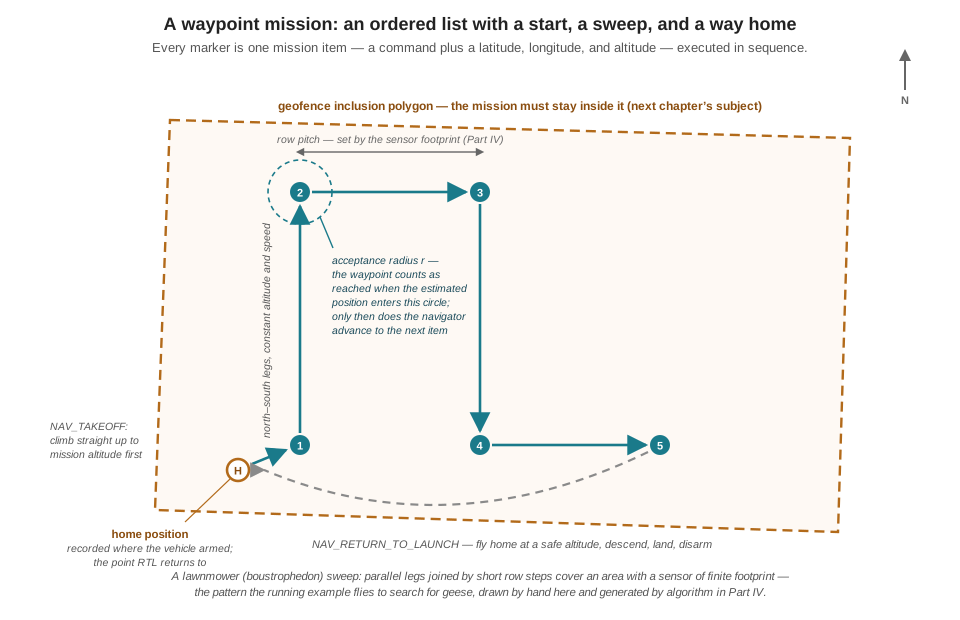
The lawnmower (formally boustrophedon — “as the ox plows”) earns a moment of respect before it is flown, because it is not an arbitrary shape. A drone searching an area with a downward-looking sensor sees a swath of finite width; parallel legs spaced at most one swath apart, joined by short row steps, are the minimal-overlap way to guarantee the whole area passes under the sensor. The row pitch in the figure is therefore not an aesthetic choice but a sensor parameter — camera field of view times altitude, derated for required overlap — and the entire pattern can be computed from the field polygon and the sensor footprint rather than clicked out by hand. That computation, and what happens to it when the target moves, is the business of the Path Planning on the Edge chapter in Part IV; here the pattern is drawn manually in QGC, which is exactly how a first search mission should be built.
11.5 Reading a Real Plan File
QGroundControl saves a drawn mission as a .plan file — plain JSON — and reading one repays the effort the way reading a hex dump of a MAVLink packet would not: every field is legible, and every field teaches something. The file examined here is a real one: a lawnmower survey of a grass field in Newark, Delaware, drawn in QGC and flown in simulation, its coordinates clustered around 39.680° N, 75.752° W. Abridged to its skeleton:
{
    "fileType": "Plan",
    "geoFence": {
        "polygons": [{
            "inclusion": true,
            "polygon": [
                [39.68034009, -75.75245036],
                [39.68036725, -75.75206443],
                [39.67992608, -75.75200019],
                [39.67990044, -75.75236953]
            ]
        }]
    },
    "mission": {
        "cruiseSpeed": 15,
        "hoverSpeed": 1.5,
        "firmwareType": 12,
        "vehicleType": 2,
        "globalPlanAltitudeMode": 1,
        "items": [
            { "command": 178, "frame": 2,
              "params": [1, 1.5, -1, 0, 0, 0, 0] },
            { "command": 22, "frame": 3, "Altitude": 5.5,
              "params": [0, 0, 0, null,
                         39.67992584, -75.75214500, 5.5] },
            { "command": 16, "frame": 3, "Altitude": 5.5,
              "params": [0, 0, 0, null,
                         39.67991219, -75.75234666, 5.5] },
            { "comment": "... eleven more NAV_WAYPOINT items ..." },
            { "command": 20, "frame": 2,
              "params": [0, 0, 0, 0, 0, 0, 0] }
        ],
        "plannedHomePosition": [39.67992611, -75.75214484, 42]
    },
    "rallyPoints": { "points": [] }
}
Top to bottom. The geofence block stores one inclusion polygon — four vertices, each a latitude/longitude pair, defining the region the vehicle must stay inside (an exclusion polygon would mark a region to stay out of). The fence is data here and law later: uploading it arms nothing by itself, but the next chapter will wire it to a failsafe so that crossing the boundary triggers RTL automatically. The mission block opens with context QGC and the firmware both consume: firmwareType: 12 identifies the PX4 dialect (the MAVLink autopilot enumeration from two chapters ago, appearing in a file on disk), vehicleType: 2 a multirotor, and globalPlanAltitudeMode: 1 declares that the plan’s altitudes are relative to home rather than absolute above sea level — the same launch-point-relative convention the barometer discussion of Part I arrived at, now a mission-wide setting. The hoverSpeed of 1.5 m/s is the planning speed for a multirotor; cruiseSpeed is the fixed-wing counterpart, present but idle.
Then the list. The first item, command 178 (DO_CHANGE_SPEED), is an action item: its frame: 2 (MAV_FRAME_MISSION) is the tell that no coordinate is attached, and its parameters read “speed type 1 — ground speed — to 1.5 m/s, throttle unchanged.” A deliberate, camera-friendly walking pace. The full file’s next item (elided above) is command 2500, VIDEO_START_CAPTURE — start recording, another action item, because a survey that isn’t recorded didn’t happen. Command 22 (NAV_TAKEOFF) then climbs to 5.5 m; its frame: 3 is MAV_FRAME_GLOBAL_RELATIVE_ALT — latitude and longitude in degrees, altitude in metres above home — and its last three parameters carry the coordinate itself. Twelve command-16 waypoints follow, every one at exactly 5.5 m relative altitude, and command 20 (NAV_RETURN_TO_LAUNCH) closes the list. Finally plannedHomePosition — the launch point the planner assumed, with its third element, 42, being the field’s ground elevation in metres above sea level. The name is a quiet warning: the real home position is recorded at arming, wherever that actually happens, and every relative altitude and the RTL destination bind to the recorded one. Launch from the wrong corner of the field and the whole mission shifts with you.
11.5.1 The geometry hiding in the sixth decimal place
The coordinates look like noise — a wall of 39.680-something — until they are converted to metres, and the conversion is worth internalizing because it turns every GPS log and plan file into geometry on sight. A degree of latitude is essentially constant at 111.3 km. A degree of longitude shrinks with the cosine of latitude, since meridians converge toward the poles:
\[ \begin{aligned} 1^\circ \text{ latitude} &\approx 111{,}320 \text{ m} \\ 1^\circ \text{ longitude at } 39.68^\circ\,\text{N} &\approx 111{,}320 \times \cos 39.68^\circ \approx 85{,}700 \text{ m} \end{aligned} \]
A convenient mental unit follows: at this latitude, the fifth decimal place of a coordinate — 0.00001° — is about 1.1 m of latitude or 0.86 m of longitude. The sixth decimal place is a decimetre. Now the file becomes a map. The fence polygon spans 0.00044° of latitude and 0.00045° of longitude:
\[ \begin{aligned} \text{fence, north--south} &\approx 0.00044 \times 111{,}320 \approx 49 \text{ m} \\ \text{fence, east--west} &\approx 0.00045 \times 85{,}700 \approx 39 \text{ m} \end{aligned} \]
— a field about half a football pitch in size. The first three waypoints share nearly one longitude while their latitude climbs by 0.000417°: a north–south leg of \(0.000417 \times 111{,}320 \approx 46.4\) m, with 7.3 m of westward drift along it (the operator’s hand was not perfectly steady on the map), for a leg length of \(\sqrt{46.4^2 + 7.3^2} \approx 47\) m. Between legs, the longitude steps east by about 0.000075°, a row pitch of roughly 6.5 m. Twelve waypoints resolve into four such legs — a 3½-pass lawnmower over the fenced field, the exact pattern of Figure 11.1 with real numbers attached.
The numbers even audit the mission’s schedule. Summing the track — a 17 m transit from the takeoff point to the first corner, four legs near 47 m, three row steps, and the RTL hop home — gives roughly 230 m of path. At the commanded 1.5 m/s ground speed:
\[ t \approx \frac{230 \text{ m}}{1.5 \text{ m/s}} \approx 153 \text{ s} \approx 2.6 \text{ min}, \]
call it three minutes once the takeoff climb and landing descent are added. Part I’s mission time budget allocated 3.5 minutes to the running example’s search leg; this real, hand-drawn plan fits that allocation with margin, and the fact that a JSON file plus two conversion constants can prove it before anything flies is the entire case for treating missions as data. (The altitude passes its own audit trivially: 5.5 m over a 42 m-elevation field is nowhere near the 122 m ceiling — though note the ceiling is measured above ground, not above sea level, a distinction the relative-altitude mode conveniently respects.)
11.6 Arrival: From Stopwatch to Acceptance Radius
The firmware’s navigator, flying that plan in Mission mode, does something the previous chapter’s Offboard node never did: it decides it has reached each waypoint before moving to the next. The test is geometric. Around every waypoint stands an invisible sphere — the acceptance radius, exposed in PX4 as the parameter NAV_ACC_RAD — and the waypoint is complete when the EKF’s position estimate enters it:
\[ \lVert \hat{\mathbf{p}} - \mathbf{p}_{\text{wp}} \rVert < r_{\text{acc}}. \]
That one inequality is the difference between a schedule and a navigation. The stopwatch scheme advances whether or not the vehicle arrived; the acceptance test advances because it arrived, and automatically absorbs everything that makes flight times unpredictable — headwinds that stretch a leg, the gentle cornering the position controller applies, a conservative speed setting. The radius itself is a genuine tuning choice with failure modes on both sides. Too large, and the vehicle “arrives” early and cuts corners: with a 10 m radius on a lawnmower whose rows are 6.5 m apart, legs blur together and coverage develops holes. Too small, and the test may never pass: the position estimate carries metre-scale GNSS scatter, and asking the vehicle to hit a 30 cm sphere through metre-scale noise produces the signature failure of an aircraft loitering beside a waypoint it cannot satisfy, mission stalled, battery draining. The radius should comfortably exceed the position estimate’s expected error and comfortably undercut the mission’s geometry — for the field above, one to two metres sits well inside both bounds.
The same test is exactly what the Offboard node from the previous chapter was missing, and retrofitting it is two lines: subscribe to /fmu/out/vehicle_local_position (the node already does, for its warm-up gate) and replace the hold-time check with the inequality. But bolting one more condition onto that node’s growing pile of boolean flags — armed_sent, land_sent, first_pos_tick — points at a deeper problem worth solving properly. The flags are a state machine, written in the least maintainable possible notation. Time to write it in the right one.
11.7 Mission Logic as a State Machine
A finite state machine is the standard shape of mission logic across robotics, and its appeal is austerity: the program is in exactly one state at any moment; each state has one job; transitions between states fire when their guard conditions — tests on observed data, not on elapsed time — become true. Nothing about the formalism is exotic; its value is what it forbids. A linear script encodes “what happens next” in the program counter, which cannot jump backward when the world misbehaves; a pile of flags encodes the current situation across four booleans whose sixteen combinations include several the author never intended. An FSM makes the situation a single enumerated value, makes every legal situation-change a drawn arrow, and makes everything not drawn illegal by construction. Figure 11.2 draws the mission node’s.
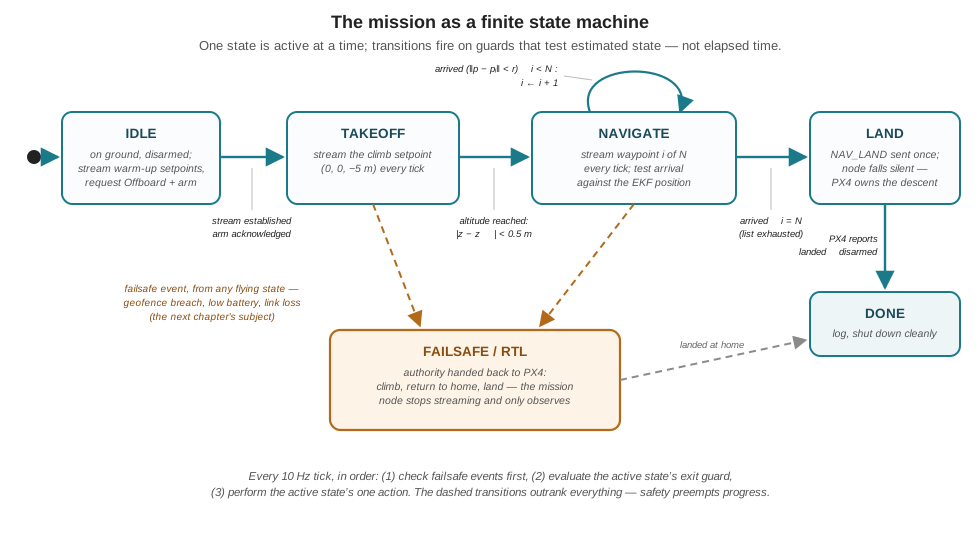
The machine keeps the previous chapter’s skeleton — a 10 Hz timer, one action per tick, the setpoint stream never pausing while the node holds Offboard authority — and reorganizes everything else. In code, the flags collapse into one enum and the branch pile becomes a dispatch:
class MissionState(Enum):
    IDLE = auto(); TAKEOFF = auto(); NAVIGATE = auto()
    LAND = auto(); DONE = auto(); FAILSAFE = auto()

ACCEPT_RADIUS = 1.5   # m — comfortably above GNSS scatter,
                      # comfortably below the 6.5 m row pitch

def arrived(self, target):
    dx = self.pos.x - target[0]
    dy = self.pos.y - target[1]
    dz = self.pos.z - target[2]
    return (dx*dx + dy*dy + dz*dz) ** 0.5 < ACCEPT_RADIUS

def loop(self):                        # the 10 Hz tick
    if self.failsafe_event():          # 1. safety outranks progress
        self.state = MissionState.FAILSAFE

    match self.state:                  # 2. one state, one job
        case MissionState.IDLE:
            self.publish_setpoint(*WAYPOINTS[0])
            if self.stream_warm() and self.arm_offboard_acked():
                self.state = MissionState.TAKEOFF
        case MissionState.TAKEOFF:
            self.publish_setpoint(0.0, 0.0, -5.0)
            if abs(self.pos.z - (-5.0)) < 0.5:
                self.state = MissionState.NAVIGATE
        case MissionState.NAVIGATE:
            wp = WAYPOINTS[self.i]
            self.publish_setpoint(*wp)
            if self.arrived(wp):
                self.i += 1
                if self.i == len(WAYPOINTS):
                    self.send_cmd(CMD_NAV_LAND)
                    self.state = MissionState.LAND
        case MissionState.LAND:
            if self.landed_and_disarmed():
                self.state = MissionState.DONE
        case MissionState.FAILSAFE:
            pass                       # stream stopped: PX4 flies RTL
Three design decisions carry the weight. First, guards test estimated state, never elapsed time: the TAKEOFF exit asks whether the vehicle is actually at altitude (within half a metre — takeoff tolerates a looser test than the mission’s own acceptance radius, since the only question is “safe to translate?”), and NAVIGATE advances on the acceptance test. Wind can now stretch any phase indefinitely without breaking the logic; the schedule became a consequence of flight instead of a controller of it. Second, the failsafe check runs before the state dispatch, every tick. Whatever the machine is busy doing, one question outranks it, and putting that question first in the tick makes the priority structural rather than aspirational. What events feed failsafe_event() — the geofence breach, the low-battery threshold, the lost link — is the next chapter’s subject; the slot they plug into is built here. Third, the machine inherits the previous chapter’s silence discipline: LAND and FAILSAFE stop streaming setpoints, because both states hand the aircraft back to PX4’s own logic, and a node that stops proving it wants control is a node that cannot accidentally retake it.
The payoff is not this small mission — the flag version flew the square too. The payoff is what the structure absorbs without deforming. Add a DETECT event from a perception node and a PURSUE state, and the lawnmower search becomes the running example’s search-then-deter behavior; add an EVADE state guarded by a proximity test, and the machine expresses the whole reactive repertoire of Part IV — every addition a new box and its arrows, every existing box untouched. The Systems Architecture chapter of Part V will draw the full machine that runs the Goose Management System; the reader will recognize it, because it is this figure with more boxes.
11.8 Proving It in SITL
Everything in this chapter converges on the workbench, and the closing exercise runs the full circuit in simulation twice — once per command path. First the mission-mode pass: draw the lawnmower in QGC over any convenient field (or load the .plan structure examined above), upload it to the SITL vehicle, arm, and switch to Mission mode. Watch the firmware’s navigator do everything this chapter described — the takeoff climb, the acceptance-radius arrivals visible as the vehicle rounds each waypoint without stopping, the speed change taking effect, the RTL climb-return-land. Then the Offboard pass: run the state-machine node against the same simulated vehicle and watch it fly the same geometry under its own arrival logic. The two passes look almost identical from Gazebo’s camera, and the difference is the point: in the first, the intelligence is in the firmware and the plan is data; in the second, the intelligence is the node and can therefore change its mind mid-flight — which is why the running example, whose mission depends on what the camera sees, is built on the second path even though the first is simpler and more robust for surveys.
Simulation is also where the chapter’s tuning claims should be tortured rather than trusted. Set ACCEPT_RADIUS to 0.2 m and watch the NAVIGATE state stall beside a waypoint while simulated GNSS noise keeps the inequality false — the mission equivalent of an integrator that never settles. Set it to 10 m and watch the lawnmower’s rows smear into a shapeless loop. Kill the node mid-NAVIGATE and watch PX4’s dead-man’s switch drop the vehicle out of Offboard into a failsafe, exactly as promised two chapters running. Each experiment costs a restart; each buys an intuition that would cost an airframe outdoors. One deliberate gap remains, and it is the seam to the next chapter: the geofence polygon has been drawn, uploaded, and ignored — nothing yet happens when the simulated vehicle wanders across it. Arming that boundary, and the battery, link-loss, and RTL failsafes beside it, turns the fence from a line in a JSON file into the thing that brings the aircraft home when everything else has gone wrong — the safety half of mission scripting, and the business of the Geofencing and Fail-Safes chapter.
11.9 Check Your Understanding
- A mission item in a
.planfile reads:"command": 16, "frame": 3, "params": [0, 0, 0, null, 39.68013, -75.75239, 5.5]. Decode the item: what command is this, what does frame 3 mean, where is the target, and what altitude will the vehicle fly there — relative to what reference?
Command 16 is NAV_WAYPOINT: fly to a position. Frame 3 is MAV_FRAME_GLOBAL_RELATIVE_ALT: the coordinate is global latitude/longitude in degrees with altitude in metres relative to the home position, not above sea level. The target is 39.68013° N, 75.75239° W, and the vehicle will fly there at 5.5 m above home — where “home” is the position the autopilot recorded at arming, not the plan’s plannedHomePosition. (The first three params are hold time, acceptance radius override, and pass-through radius; zeros mean “use defaults,” and the null is an unused yaw field.)
- Two teams fly the same lawnmower survey. Team A uploads the mission and flies it in Mission mode; Team B streams the waypoints from a companion-computer node in Offboard mode. Mid-flight, the telemetry link to the ground station drops for both, and Team B’s node process crashes. What happens to each aircraft, and what does the comparison say about when each command path is the right choice?
Team A’s aircraft continues the mission unaffected: the plan was uploaded and lives on the flight controller, and the firmware’s navigator needs no link to execute it (the link-loss failsafe may be configured to continue-mission for exactly this case). Team B’s aircraft loses its setpoint stream; within about half a second PX4’s dead-man’s switch detects the stall, exits Offboard, and executes a failsafe such as RTL — a controlled recovery, not a continuation. The comparison is the decision rule: for a fixed, pre-plannable flight (a survey), Mission mode is more robust because the intelligence is in the firmware and the plan is data. Offboard earns its fragility only when the mission must change in response to live data — as the running example’s must — because only mission code can change its mind mid-flight.
- Two consecutive waypoints in the worked plan sit at (39.67991219, −75.75234666) and (39.68032916, −75.75243136). Using 111,320 m per degree of latitude and 85,700 m per degree of longitude at this latitude, compute the leg length between them. Then estimate how long the leg takes at the plan’s commanded 1.5 m/s ground speed.
Latitude difference: \(0.00041697^\circ \times 111{,}320 \approx 46.4\) m north. Longitude difference: \(0.0000847^\circ \times 85{,}700 \approx 7.3\) m west. Leg length \(\sqrt{46.4^2 + 7.3^2} \approx 47\) m. At 1.5 m/s the leg takes about \(47 / 1.5 \approx 31\) s. (The general skill: at mid-northern latitudes, read the fifth decimal place of a coordinate as roughly a metre — 1.1 m of latitude, 0.86 m of longitude — and any plan file or GPS log becomes geometry by inspection.)
- A student’s mission node stalls: the vehicle hovers a metre from waypoint 3 indefinitely, mission never advancing, until the battery failsafe finally lands it. Another student’s vehicle “completes” the same lawnmower suspiciously fast, but the recorded coverage has gaps between rows. Diagnose both, and state the two bounds that a well-chosen acceptance radius must respect.
The first student’s acceptance radius is too small relative to the position estimate’s noise: GNSS scatter of a metre or more keeps \(\lVert \hat{\mathbf{p}} - \mathbf{p}_{\text{wp}} \rVert\) from ever dropping below the threshold, so the arrival guard never fires — the vehicle orbits a test it cannot pass. The second student’s radius is too large relative to the mission’s geometry: the vehicle “arrives” several metres early at each waypoint and cuts the corners, so legs shorten and inter-row coverage opens gaps (with a radius comparable to the row pitch, adjacent legs blur together). The bounds: the radius must comfortably exceed the expected position-estimation error (or arrival never triggers) and comfortably undercut the smallest geometric feature of the mission, such as the row pitch (or the pattern deforms). For metre-scale GNSS noise and a 6.5 m pitch, one to two metres satisfies both.
- In the state machine of this chapter, the failsafe check is evaluated before the state dispatch on every tick, rather than as a transition drawn from each individual state’s logic. Give the engineering argument for this ordering, and explain what property of the flag-based implementation from the previous chapter it repairs.
Evaluating the failsafe first makes safety preemption structural: no matter which state is active — including states added years later by someone who never read the original code — the failsafe question is asked and answered before any state’s own logic runs, so no code path can shadow it. Encoding it per-state would require every current and future state to remember to include the check, converting a guarantee into a convention. The flag implementation had the related defect that the “current situation” was distributed across several booleans whose combinations included unintended ones (e.g., branch-ordering bugs where a landing check could be bypassed); the FSM makes the situation a single enumerated value and makes every legal change of situation an explicit, drawn transition — everything not drawn is impossible by construction.
- The plan file contains both a
plannedHomePositionand, implicitly, the home position the autopilot will record at arming. A field crew loads the plan but launches from the opposite corner of the field, 40 m from where the plan was drawn. Which parts of the mission shift with the actual launch point, which parts do not, and what is the operational lesson?
The recorded home position — set at arming — becomes the reference for everything home-relative: the takeoff climb happens wherever the vehicle actually is, all relative altitudes are measured above the actual launch elevation, and RTL returns to the actual launch point, 40 m from where the plan’s author assumed. The waypoints themselves do not shift: they are absolute latitude/longitude coordinates, so the lawnmower is flown over the intended ground regardless of launch point (only the transit to the first waypoint changes). The geofence polygon likewise stays fixed to the earth. The lesson: plannedHomePosition is a planning convenience, not a command — verify before arming that the actual launch point is inside the geofence, that the transit to waypoint one is clear, and that the RTL destination (where the vehicle really sits) is where you want an emergency return to end.
11.10 Try It
Part 1 — fly both command paths on the workbench. Stand up SITL (make px4_sitl gz_x500, plus QGroundControl) and reproduce this chapter’s closing circuit. Draw a lawnmower of at least four waypoints over any field on QGC’s map at 5–10 m altitude, add a takeoff item, a DO_CHANGE_SPEED to 2 m/s, and a closing RTL; save the .plan, then open it in a text editor and find every field this chapter decoded — commands 22, 16, 178, 20, the frames, the altitude mode, the planned home. Upload and fly it in Mission mode, watching arrivals round the corners. Then convert your own waypoints to metres with the two conversion constants, predict the mission duration, and check the prediction against the simulator’s clock. Finally, port the same waypoint list (converted to local NED coordinates about the home point) into the state-machine node and fly it again in Offboard mode. One mission, two intelligences.
Part 2 — break the arrival test, then armor the machine. Extend the dry-run harness from the previous chapter’s Try It to the FSM version: feed the node a scripted position stream (a point moving at 1.5 m/s along the plan plus Gaussian noise of \(\sigma = 1\) m per axis) and verify every transition fires in order. Now lower ACCEPT_RADIUS until the NAVIGATE state stalls, and record the failure threshold — it should land near where the noise magnitude predicts. Restore a sane radius, then add one state of your own: a HOLD state entered from NAVIGATE when a simulated detection flag goes true, which loiters at the current position for five seconds before resuming the list at the same index. Confirm you touched no existing state’s logic to do it — then write two sentences on why the flag-based version of the same change would have been riskier. You have just rehearsed, in miniature, how the running example’s search behavior will absorb Part III’s detector.
Related Lab: See Appendix B for the lab assignment that applies this chapter’s concepts.